

An outbound AI campaign is a calling operation in which an AI voice agent dials a list of prospects, holds a real two-way conversation, qualifies who is a fit, and books an appointment or transfers the call to a human. It is not a recorded message played at a phone number.
Building an outbound AI campaign is mostly unglamorous work done in the right order. List hygiene, consent records, a script that survives the first five seconds, and a test batch small enough that you can afford to be wrong.
This is the eight-step outbound AI campaign build, with the benchmark numbers to check at each stage, the compliance items that stop a campaign cold, and an honest account of which claims in this category are measured and which are vendor estimates.
TL;DR
Build an outbound AI campaign in eight steps. One measurable goal, a clean and consented list, a platform, a script, compliance setup, a test batch of 200 to 500 contacts, analysis, then scale. Never load the full list first.
For AI voice calls to consumer cell phones, prior express written consent is generally required before you dial, and calling lists must be scrubbed against the National Do Not Call Registry at least every 31 days. If you cannot document consent per number, stop here and fix the intake forms. No platform makes that problem go away, and running the campaign anyway just makes it faster.
Key takeaways
- An outbound AI campaign has an AI voice agent hold the first conversation, not play a recording.
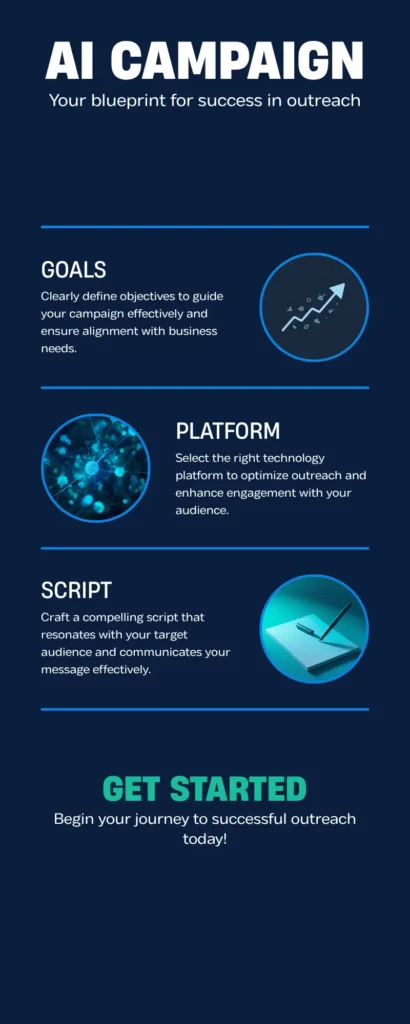
- The eight outbound AI campaign steps are goal, list, platform, script, compliance, test batch, optimization, scale.
- List quality moves results more than script quality. A clean consented list beats a bigger messy one.
- Test on 200 to 500 contacts before touching the rest of the file.
- Five numbers tell you what is broken. Connect rate, completion rate, qualification rate, conversion rate, opt-out rate.
- The FCC one-to-one consent rule was vacated in January 2025 and never took effect. Prior express written consent remains the standard.
- A managed provider can go live in roughly 3 to 5 business days when consent records, CRM access, and script approval are ready.
Table of contents
- What an outbound AI campaign is
- The outbound calling process, stage by stage
- Step 1. Define one goal and your ICP
- Step 2. Build and clean your list
- Step 3. Choose your platform
- Step 4. Write the script
- Step 5. Set up TCPA compliance
- Step 6. Run a small test batch
- Step 7. Analyze and optimize
- Step 8. Scale carefully
- Benchmarks and what they mean
- Who should not build one
- Outbound AI campaign FAQ
- The bottom line
What an outbound AI campaign is
An outbound AI campaign is a coordinated calling operation in which an AI voice agent calls a defined list of prospects on your behalf, conducts real conversations rather than playing recordings, listens and adapts to what the person says, answers common questions, and moves qualified prospects to the next step in your sales process.
The goal is always one of a few things. Appointment setting is the most common. Lead qualification is next. Re-engaging dormant CRM records is a third. Some teams use it for post-conversion work such as appointment reminders and satisfaction checks.
What separates this from a dialer campaign is the conversation itself. A traditional auto-dialer plays a message and disconnects. An AI voice agent responds in real time to what the person actually said. That is a meaningfully different experience for the person answering, though how much it improves conversion depends entirely on your list, offer, and script rather than on the technology by itself.
The outbound calling process, stage by stage
Every outbound AI campaign runs the same sequence, which takes a contact from your list to a logged outcome. Learn it before you build, because each stage has a different optimization lever and a different failure mode.
- Dial attempt. The AI dials. The call connects or it does not. Unanswered calls route to a voicemail sequence or get redialed at a different hour.
- Live answer. The person picks up. The first few seconds decide whether they stay. The opening has to establish relevance immediately.
- Qualification conversation. The AI asks two to four questions to decide fit. For appointment setting that usually covers need, timeline, and authority.
- Next step. A qualified prospect gets an appointment booked directly in your calendar, a live transfer to a human, or a follow-up message with a booking link.
- Disposition logging. Every outcome is recorded. Connected, no answer, not interested, appointment set, transferred. This is the data that drives everything in step 7.
Knowing the stages tells you where the campaign leaks. A low connect rate is a list or number-health problem. A good connect rate with poor conversion is a script problem. Strong conversion with weak appointment show rates is a follow-up problem, and no amount of script rewriting will fix it.
Step 1. Define one goal and your ICP
Every outbound AI campaign needs a single measurable goal before anything else gets configured. Appointments booked, qualified leads transferred to a closer, callback requests confirmed, customer re-engagement, or survey completion. Pick one. Campaigns built to do two things at once usually do neither.
Then define the ideal customer profile, because that determines who goes on the list. Be specific. Vague targeting produces wasted dials and low conversion.
A specific ICP reads like this. Sales manager or VP of sales at an insurance agency with 5 to 50 agents, located in Florida, Georgia, or Texas, currently running an outbound dialer at 1,000 or more calls a day.
A vague ICP reads like this. Businesses that might need AI calling. The tighter the profile, the better the script lands, the cleaner the list, and the higher the conversion. Our industries overview is a reasonable starting point if you are deciding which segment to attack first.
Step 2. Build and clean your list
List quality determines campaign quality more than any other single input. A well-written script on a bad list produces bad results. A plain script on a clean, well-targeted list produces good ones.
Where to source contacts
B2B data platforms such as ZoomInfo and Apollo.io let you filter by job title, industry, company size, location, and installed technology. Your own CRM is the better source for re-engagement, because those contacts already know your brand and typically convert at higher rates than cold records. Purchased or rented broker lists work, but they need rigorous consent verification before a single dial, and the consent you inherit is only as good as the form the consumer actually saw.
How to clean it before loading
Deduplicate by phone number rather than by name, because the same person shows up under different spellings. Scrub against the National Do Not Call Registry, and understand that covered sellers and telemarketers must synchronize at least every 31 days. Validate the numbers. Drop landlines from mobile-only campaigns and remove disconnects. Purge anyone who has ever opted out of contact from your organization, permanently, not just for the campaign that captured the request.
For a first outbound AI campaign, start with 500 to 1,000 contacts. That is enough to produce usable signal without burning the whole file if the script needs work.
Step 3. Choose your platform
The platform behind your outbound AI campaign decides your compliance capability, call quality, reporting depth, and how fast you can deploy. Ask every provider the same four questions.
Is compliance built into the platform or handled separately by your team? If it is separate, you are manually managing consent verification, calling windows, and opt-outs, which is expensive and risky. What connect rates do their existing campaigns produce, and on what kind of list? What is realistic setup time? Who is actually assigned to your account, a named person or a ticket queue?
| Approach | Time to first live call | Who owns compliance | Best fit |
|---|---|---|---|
| Managed AI platform | Days, when consent and CRM access are ready | Shared, with the platform enforcing windows and opt-outs | Sales teams without engineering capacity |
| DIY AI API | Weeks, depending on your developers | Entirely you | Teams with engineers and unusual workflow needs |
| Traditional dialer | Days, but reps still make every call | Entirely you | Teams with idle rep capacity and a list to work |
| In-house SDR team | Weeks to months, including hiring | Entirely you | Complex, consultative, low-volume outreach |
DIY tools such as Vapi and comparable APIs give you maximum customization and a lower per-call rate. They also require engineering time to build and maintain, and compliance sits entirely with you. Managed platforms handle setup, compliance workflow, number health, and ongoing optimization, which for most sales operations is faster and cheaper once you price in developer hours and compliance risk. If you have engineers and an unusual workflow, DIY is a legitimate answer, and we would rather say so than pretend otherwise.
Step 4. Write the script
The script is the backbone of the outbound AI campaign. Everything the AI says comes from it, and a weak one undermines every other decision you made.
Opening, 3 to 5 seconds
The AI identifies itself as an AI immediately, names the company, and gives a one-sentence reason for the call that is relevant to this specific prospect. For example. “Hi, this is Aria, an AI assistant calling from Bigly Sales. I am reaching out to insurance agencies in Florida about automating outbound calling without the compliance headaches. Is this a good time for one quick question?”
Qualification, 30 to 60 seconds
Two to three focused questions that establish fit. Keep them conversational rather than interrogative. “Roughly how many outbound calls does your team make in a day?” lands better than “What is your current call volume?”
Value bridge, 15 to 30 seconds
One or two sentences connecting what you just learned to what you offer. Deliver it only when the qualification answers indicate a fit. Delivering it to an unqualified prospect is how opt-out rates climb.
The ask, 10 seconds
One clear next step. “Can I put 20 minutes on the calendar with someone from our team to show you how this works?” Not a menu of options, and not a vague offer to send more information.
Objection handling
Pre-write responses to the four to six objections you actually hear. We already have a dialer. We tried AI and it did not work. We are not interested. Each gets one or two sentences that acknowledge the objection and offer a single specific counter.
Opt-out handling
Every call offers an easy exit. “If you would like to be removed from our calling list, tell me and I will take care of that right now.” The removal must be immediate and permanent.
Three things to keep out of the script. Long introductions, because the decision to stay on the line happens in the first few seconds. Any phrasing designed to obscure that the caller is an AI, which destroys trust the moment it is suspected and creates deception exposure under FTC rules. And more than one ask, because a call offering a demo, a trial, and a consultation converts worse than a call offering one thing.
Skip the build
Get a working campaign in days, not weeks
We write the script, wire the compliance checks, and run the test batch with you. The first review call takes about 20 minutes.
Step 5. Set up TCPA compliance
Compliance in an outbound AI campaign is an ongoing operational process, not a one-time configuration. This is the step that stops campaigns, so treat it as the gate rather than the paperwork.
Consent
For covered consumer telemarketing calls using an AI-generated, artificial, or prerecorded voice, prior express written consent is generally required before dialing. That consent must be documented, dated, and tied to the type of communication the person agreed to receive. Consent management platforms capture that record automatically, and you want it captured before the lead ever enters the campaign.
The one-to-one consent rule that never took effect
You will still see decks claiming an FCC one-to-one consent rule became binding in January 2025 or January 2026. It did not. The Eleventh Circuit vacated it in January 2025 and it never took effect, so prior express written consent under the TCPA remains the operative standard.
Adopt one-to-one consent as internal policy anyway. Naming the specific companies a consumer agrees to hear from makes your consent records far easier to defend later. Treat it as litigation risk reduction rather than a legal requirement. The 2026 item that does apply is the cross-channel revocation requirement, where an opt-out delivered by any reasonable method has to be honored across every channel your company uses.
Calling windows and Do Not Call
Federal rules permit covered telemarketing calls between 8 a.m. and 9 p.m. in the recipient’s local time, and several states are stricter. Your platform should enforce the recipient’s time zone automatically, not your office time zone. Scrub against the National Do Not Call Registry on the required cycle and honor your internal do-not-call list permanently. The FTC guidance on the Telemarketing Sales Rule is the clearest primary source, and the statute is on govinfo.
Disclosure
AI-generated voices count as artificial voices for TCPA purposes, which is what drives the written consent requirement. Separately, several states have enacted or proposed disclosure rules for automated callers, and identifying the AI at the top of the call is best practice regardless. Have the agent say it plainly in the opening.
Pick a platform where these controls are infrastructure rather than a checklist someone on your team remembers to run. Ours enforces calling windows, integrates consent verification, manages opt-outs in real time, and retains documentation for audits, and our legal and compliance overview covers the specifics. None of this is legal advice, and every workflow here should go past your own counsel before launch.
Step 6. Run a small test batch
Before loading the full list, run 200 to 500 contacts. The point is to find problems in the script, the compliance setup, or the targeting while they are still cheap.
Measure five things. Connect rate, the share of dials that produce a live conversation. Conversation completion rate, the share of connected calls that get through the full qualification. Qualification rate, the share of completed conversations that match your ICP. Conversion rate, the share of qualified prospects who take the next step. Opt-out rate, the share who ask to be removed.
Analyze all five before scaling anything. A problem you fix at 300 contacts is a lesson. The same problem at 10,000 contacts is a burned list.
Step 7. Analyze and optimize
The test data tells you exactly where the outbound AI campaign is leaking. The diagnosis is usually unambiguous.
- Low connect rate. List quality or number health. Check whether carriers are flagging your numbers as spam, rotate numbers, and tighten list hygiene.
- Good connect rate, early hang-ups. The opening is not landing. Rewrite the first five seconds and test a different relevance hook, or open with a question instead of a statement.
- Good completion, low qualification. The list does not match the ICP. Go back to step 2 and tighten the targeting criteria.
- Good qualification, low conversion. The value bridge or the ask is weak. Rewrite the section between qualification and the next step and tie it explicitly to what the prospect just told you.
- Good conversion, poor show rate. This is a follow-up problem, not a calling problem. Add an automated confirmation sequence with reminders 24 hours and 2 hours before the appointment.
Change one variable at a time. Rewriting the opening, swapping the list source, and moving the calling window in the same week leaves you with no idea which change worked.
Step 8. Scale carefully
Once the test metrics hold, load the rest of the list into the outbound AI campaign. Most platforms handle high concurrency without degradation, so the constraint is rarely technical.
Monitor daily for the first two weeks at scale. Watch for connect rate drops, which usually signal number health, and opt-out spikes, which usually signal that targeting has drifted from the ICP.
Add new segments in batches rather than all at once, so you can compare segments against each other and learn which criteria produce the best results. Refresh the list monthly, because numbers change and people leave companies. A list that connected well in month one will degrade without ongoing cleaning.
Plan human capacity before you scale, not after. A working outbound AI campaign produces more qualified conversations than most teams have closers to handle, and booked appointments nobody works are worse than no appointments at all. If speed to lead on the human side is already your weak point, fix that first.
Benchmarks and what they mean
Treat the outbound AI campaign ranges below as diagnostic thresholds rather than promises. Real performance varies with list source, offer, vertical, geography, and time of day, and any vendor quoting you a fixed number should be asked for the denominators behind it.
| Metric | Investigate below | Looking strong above | What it points to |
|---|---|---|---|
| Connect rate | 20% | 40% | List quality and number health |
| Conversation completion | Most calls ending inside 15 seconds | Majority reaching qualification | The opening line |
| Qualification rate | 20% | 35% | Targeting against your ICP |
| Conversion rate | 5% | 15% | Value bridge and the ask |
| Opt-out rate | Rising week over week | Flat and low | List targeting and offer relevance |
Who should not build one
If you cannot document consent for the numbers you intend to call, do not build this yet. Automation makes an existing consent gap faster and far more visible, which is the opposite of what you want.
If your total eligible list is a few hundred records, the setup effort will not pay back. Dial them yourself and spend the money on lead generation instead.
And if your closers already miss the appointments they have, more booked appointments will produce more no-shows with your company’s name on them. That is a management problem, and an outbound AI campaign will amplify it rather than solve it.
Outbound AI campaign FAQ
What is an outbound AI campaign?
It is a coordinated calling operation where an AI voice agent calls a list of prospects, holds real two-way conversations, qualifies who fits your criteria, and moves interested people to a next step such as a booked appointment or a live transfer to a human. It differs from an auto-dialer because the agent responds to what the person actually says rather than playing a recording.
What does the call feel like for the prospect?
A brief, relevant phone conversation. The AI identifies itself as an AI, gives a one-sentence reason for the call, asks two or three focused questions, then either books a next step or thanks the person for their time. At no point should the prospect be misled about whether they are speaking with a human, and any script that blurs that line is a liability.
How many contacts do I need to start?
A test batch of 200 to 500 contacts generates enough signal to judge the script, the targeting, and the compliance setup. You do not need a large file to validate a campaign. For the first full run after the test, 500 to 1,000 contacts is a sensible size before you commit the remainder of the list.
What connect rate should I expect?
It varies too much for a single number to be meaningful. Ranges depend on list source, vertical, geography, number health, and time of day. Use the thresholds diagnostically instead. Under 20% points at list quality or number health, and above 40% on a targeted list is doing well. Ask any vendor quoting a specific rate what list and period it came from.
How long does it take to build one?
With a managed provider, roughly 3 to 5 business days from agreement to live calls, covering number provisioning, script configuration, compliance setup, and testing. That assumes your consent records, CRM access, and script approvals are ready. DIY builds take longer and depend on your engineering capacity. Compliance review, not technology, is usually what sets the timeline.
Is AI calling TCPA compliant?
It can be, when consent verification, calling window enforcement, Do Not Call scrubbing, opt-out management, and clear AI disclosure are all in place. For covered consumer calls using an AI-generated or artificial voice, prior express written consent is generally required before dialing. These obligations apply to outbound calling generally, not only to AI campaigns. Review your specific workflow with counsel.
Did the FCC one-to-one consent rule take effect?
No. The Eleventh Circuit vacated it in January 2025 and it never took effect, so prior express written consent under the TCPA remains the operative standard. Many teams still adopt one-to-one consent as internal policy, because naming the specific companies on a lead form makes consent records considerably easier to defend if a claim is filed.
How do I write an effective AI script?
Short relevant opening, two to three qualification questions, a value bridge tied to what the prospect just said, and a single clear next-step ask. A typical qualified conversation should run 60 to 90 seconds end to end. Pre-write responses to your four to six most common objections, and make the opt-out offer explicit rather than buried.
What is the biggest first-timer mistake?
Skipping the test batch and loading the whole list on day one. That turns a fixable script or targeting problem into a large-scale waste of a valuable file, and it burns numbers you will need later. Always run 200 to 500 contacts first, read the transcripts yourself, and only scale once the five test metrics hold.
Can I integrate with my CRM?
Yes. Most managed platforms log call outcomes, disposition codes, transcripts, and appointment data back into major CRMs automatically. That matters more than it sounds, because outcomes stranded in a separate dashboard get ignored by the sales team within a month and you lose the audit trail that compliance review depends on.
The bottom line
An outbound AI campaign is not hard to build. It is easy to build badly, usually by skipping the list work and the consent audit to get to the interesting part. The teams that get results run the eight steps in order and treat the test batch as a real gate rather than a formality.
Start with one goal, a small clean list, and a script you have read out loud. Check the five test metrics, fix the weakest one, and scale a segment at a time. If the consent records are not there, fix that before anything else, because it is the only step where getting it wrong costs more than a wasted month.
Test batch first
Run 300 contacts before you commit the list
We will build the script, run the batch, and walk you through the five metrics with real transcripts. No full-list commitment required.