
data
login
access
account
What The Bigly Sales MCP Server Is
The Bigly Sales MCP server connects your calling data to the AI assistant you already use every day. It is built on the Model Context Protocol, the open standard that lets AI assistants reach outside software. New to the idea? Start with What Is MCP?
You ask in plain language
Type a question like “who picked up today and wants a demo?” into Claude, ChatGPT or another MCP-compatible assistant.
The assistant asks Bigly
Through the Model Context Protocol, the assistant reaches your Bigly Sales account and pulls the calls, leads and campaign numbers behind the question.
The answer lands in the chat
No dashboard to open and no spreadsheet to export. The result sits right in the conversation, ready for your next question.
Ask Your Calls A Question
Once it is connected, these are the jobs customers hand to their assistant.
Call outcomes
Pull outcomes and dispositions for any campaign and any date range, grouped however you want to read them.
Summaries and transcripts
Get the summary or full transcript of a call before a rep picks up the phone for a callback.
Interested leads
Find the leads who showed real interest on the call, so your closers start with the warmest conversations.
Follow-up lists
List everyone who said “call me back Thursday” and hand the list straight to your reps.
Contacts and lists
Add or update contacts and send a fresh list into an active campaign, without a CSV round trip.
Pacing and minutes
Check how a campaign is pacing and how many minutes it has used so far this cycle.
Questions Sales Managers Ask Every Day
Specific questions get specific answers. Name the campaign and the date range and ask for a list, not just a count.
| You ask | What comes back | Why it helps |
|---|---|---|
| Who picked up today and wants a demo? | A list of today’s connected calls where the lead asked for a demo | Reps start with the hottest leads, not the top of a report |
| Who asked us to call back this week? | Leads who requested a follow-up, with the day they asked for | No callback falls through the cracks |
| Summarize the call with this lead before I dial. | A short summary of what was said, with the transcript behind it | The rep picks up already knowing the context |
| How is the insurance campaign pacing? | Calls placed, connects and minutes used so far | Spot a slow campaign in seconds, not at month end |
| Add these 200 contacts to the reactivation campaign. | The contacts created or updated and sent into the active campaign | New leads get called without an export and import |
Access Works Through Your Account
Your account, your boundaries
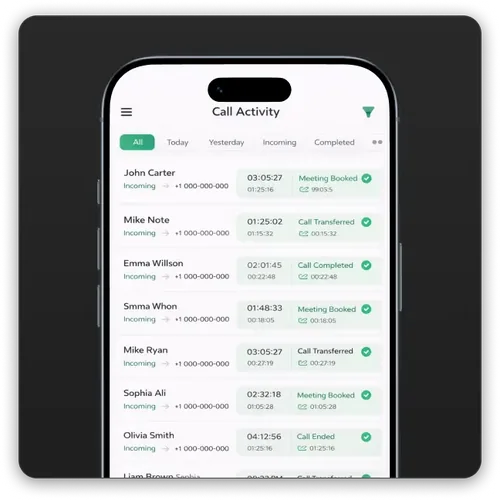
The server works through each customer’s existing Bigly Sales account, so the assistant only sees what that account is allowed to see.
Compliance stays in the platform
Consent records, DNC scrubbing and local-time calling windows are enforced before every dial. An assistant starting the work does not change who you are allowed to call.
Decide who connects
Choose which people on your team connect an assistant and what they may change, and check any number you plan to act on.
MCP vs Dashboard vs Export
The MCP server does not replace the dashboard for deep review. It replaces the small trips you make there many times a day.
| What matters | Ask through the MCP server | Dashboard or export |
|---|---|---|
| How you get an answer | Ask your AI assistant in plain language | Log in and find the right report, or download a file |
| Best for | Quick questions and follow-up lists all day long | Deep campaign reviews and custom analysis |
| Freshness | Pulled from your account when you ask | An export is out of date soon after you save it |
| Extra logins | None, it lives in the assistant you already use | One more tab, one more password |
| Who still runs the calling | Bigly Sales, fully managed | Bigly Sales, fully managed |
From Question To Answer
Connect your assistant
Link Claude, ChatGPT or another MCP-compatible assistant to your Bigly Sales account. Your account representative can walk your team through it.
Ask a question
Ask about outcomes, interested leads, follow-ups, pacing or minutes, the way you would ask a colleague.
The assistant pulls the answer from Bigly
It requests only what your account is allowed to see and returns the result in the chat.
Act on it
Hand a follow-up list to your reps, read a transcript before a callback, or send new contacts into an active campaign.
Bigly Sales MCP server questions answered
What is the Bigly Sales MCP server?
It is a Model Context Protocol (MCP) server for the Bigly Sales platform. It lets an AI assistant such as Claude or ChatGPT read your Bigly calling data and, where your account allows it, act on that data when you ask. You get answers about your calls in the chat window you already use, instead of logging into another dashboard.
Which AI assistants does it work with?
Claude, ChatGPT and other assistants that support MCP. MCP is an open standard, so any MCP-compatible assistant can connect to it.
Who can use it?
The Bigly Sales MCP server is available now to all Bigly Sales customers.
What can I ask it?
Call outcomes, call summaries and transcripts for any campaign; which leads showed real interest or asked for a follow-up; how a campaign is pacing and how many minutes it has used. You can also add or update contacts and send a fresh list into an active campaign.
Can the assistant see data from other accounts?
No. The server works through your existing Bigly Sales account, so the assistant only sees what that account is allowed to see.
Does Bigly still run my calling?
Yes. Bigly Sales still builds, runs and tunes your campaigns, the same as always. The MCP server does not change that. It just puts the results one question away.
Does connecting an assistant change who I am allowed to call?
No. Consent, do-not-call scrubbing, calling windows and the rest of the TCPA guardrails are enforced by the Bigly platform before every dial, whether a campaign was started from the dashboard or from an assistant.
Where can I learn what MCP is?
Read our plain-English explainer, What Is MCP?, or our guide to the MCP server for AI calling.
Your Calls, One Question Away
Book thirty minutes and we will show you a live Bigly campaign and how its results look from inside your AI assistant.


