
Works with the CRM you already run
 HubSpot
 Salesforce
 Zoho CRM
 Pipedrive
 GoHighLevel
 monday CRM
 Close
Close Follow Up Boss
 Keap
Keap ActiveCampaign
 Freshsales
 Dynamics 365
- HubSpot
- Salesforce
- Zoho CRM
- Pipedrive
- GoHighLevel
- monday CRM
- Close
- Follow Up Boss
- Keap
- ActiveCampaign
- Freshsales
- Dynamics 365
Not on the list? If your CRM has an API or can receive a webhook, Bigly integrates with it. Ask us about yours →
CRM integration for AI calling, defined
CRM integration for AI calling is the two-way connection between your customer database and the AI voice agent that dials on your behalf: events in the CRM, such as a new lead or a stage change, start a call within seconds, and the call's outcome, including disposition, transcript, recording, structured answers and opt-out status, is written back to the contact record without anyone typing a note.
Bigly Sales builds that connection for you. Where a native connector exists we use it; where it does not, we integrate directly with the CRM's API or webhooks, and Zapier or Make cover the long tail. Your reps keep working in the CRM they know.
Every Call, Fully Logged
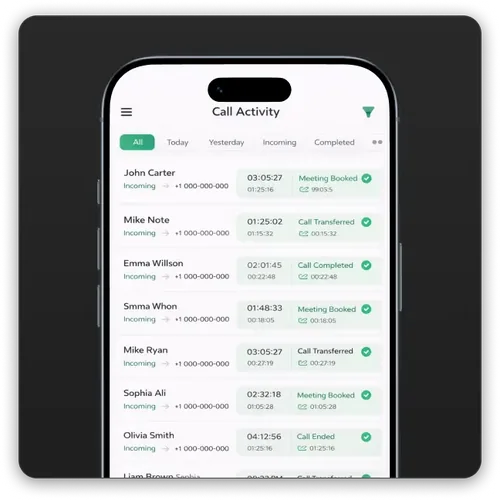
After each call, qualified or not, Bigly pushes the complete record to the contact. Nothing is retyped and nothing waits for a rep to remember.
Call Disposition
Interested, appointment booked, transferred, not interested, wrong number, callback requested, or your own custom outcomes.
Full Transcript
The complete conversation as text on the record, searchable and ready for coaching or dispute resolution.
Recording Link
A secure link to the call audio, retained according to your compliance policy.
Structured Qualification Answers
Every question the AI asked, mapped to a CRM field: budget, timeline, coverage type, vehicle of interest, whatever your script captures.
Appointment and Transfer Events
Booked meetings land on the calendar and the record; live transfers are logged with the rep who took the call.
Opt-Out and DNC Flags
A stop request on a call is written back instantly and honoured in both systems before the next dial.
Campaign Metrics
Contact rate, qualification rate, transfers and appointments by lead source, pushed to your reporting fields or dashboards.
What Disconnected Systems Cost
Manual Logging
Reps spend a quarter of the day typing notes that are late, thin or missing. With Bigly the record is complete before the rep opens it.
Leads Stuck Between Systems
A lead that lives in a spreadsheet, an inbox or a vendor portal is a lead nobody calls. When the CRM is the trigger, every lead is called.
Reporting Nobody Trusts
If half the calls are never logged, every dashboard is wrong. Automatic write-back gives you contact and conversion numbers you can run the business on.
Native, API or Automation Platform
Three ways to connect, chosen by what your CRM supports and how fast you need to launch
| Route | Best For | What Bigly Needs From You |
|---|---|---|
| Native connector | HubSpot, Salesforce, Zoho, Pipedrive, GoHighLevel, monday, Close, Follow Up Boss, Keap, ActiveCampaign, Freshsales, Dynamics 365 | Authorise the connection and approve the field map |
| Direct API or webhook | Any CRM, dialer or lead router with a REST API, webhooks or ADF/XML lead intake | Endpoint or webhook URL, API key or OAuth app, field map |
| Zapier or Make | Long-tail or in-house CRMs without a public API, quick pilots | A Zap or scenario we help you build, usually in an afternoon |
From First Connection to Real-Time Sync
A typical CRM integration, start to finish, with our team doing the build.
Connect
We authorise the native connector, or you share an API endpoint or webhook URL with scoped credentials. For dealership and mortgage CRMs we accept ADF/XML lead posts as the trigger.
Map the fields
Together we decide which CRM events start a call, which script each one runs, and which Bigly outcomes land in which CRM fields. Custom fields are created where needed.
Trigger
A new lead, a stage change, a tag or a due task fires the webhook and the AI calls within seconds, on a registered number, inside TCPA and state calling windows.
Sync back in real time
Disposition, transcript, recording, answers, appointments and opt-outs are written to the record as the call ends. Suppressions sync both ways.
If your CRM has an API, we integrate. Send us the API documentation and we will confirm the route and the timeline the same day. See the full list of Bigly Sales features.
Watch
Hear the call, then see the record
This is a real Bigly Sales agent working a live call. Every word of it lands on the contact record, along with the recording and the disposition.
Your reps see the transcript before they ever pick up the phone.
Questions People Ask Before They Call Us
Real questions from search, answered directly.
I need an AI contact center that integrates with our existing phone system and handles both inbound customer service and outbound prospecting at scale. Does Bigly do that?
Yes. Bigly Sales runs inbound and outbound on one platform and connects to what you already have. Inbound customer-service calls can be forwarded from your existing phone system or SIP trunk to Bigly's agents, which answer around the clock, resolve routine requests and transfer the rest to your team with context. Outbound prospecting runs from Bigly's registered local-presence numbers at campaign scale, with TCPA and state rules enforced on every dial. Both sides write transcripts, recordings and dispositions to your CRM, and warm transfers land on your existing extensions or queues. See AI Answering Service for the inbound side and Built For Sales Teams for outbound.
CRM integration questions answered
Common questions from RevOps, sales and IT teams connecting Bigly Sales to their CRM.
Which CRMs does Bigly Sales integrate with?
Bigly Sales integrates natively or through their public APIs with HubSpot, Salesforce, Zoho CRM, Pipedrive, GoHighLevel, monday CRM, Close, Follow Up Boss, Keap, ActiveCampaign, Freshsales and Microsoft Dynamics 365, and with dealership and mortgage CRMs that accept ADF/XML or REST leads. Any CRM that exposes an API or can receive a webhook can be connected; Zapier and Make cover the long tail.
How does the CRM integration actually work?
Two directions. Inbound to Bigly: a new lead or a status change in your CRM triggers an AI call within seconds through the CRM's webhook or API. Outbound to your CRM: after every call Bigly writes the disposition, full transcript, recording link, structured qualification answers, appointment or transfer event and any opt-out flag back to the contact record in real time, so nothing is logged by hand.
What do I need to provide to connect a CRM with an API?
Three things: the API endpoint or webhook URL, an authentication method such as an API key or OAuth app, and a field map that says which Bigly outcomes go into which CRM fields. Our team builds and tests the connection; most integrations are live in one to three business days.
Can Bigly trigger calls from CRM events other than new leads?
Yes. Any event the CRM can emit can start a cadence: a deal stage change, a task due date, an appointment that was not confirmed, a renewal date approaching, or a tag being applied. Each trigger can run its own script and its own follow-up cadence.
Do transcripts and recordings live in my CRM or in Bigly?
Both. Every transcript and recording is stored in the Bigly dashboard, and a link plus the transcript text are written to the CRM record so your reps and managers never have to leave the tools they already use. Retention follows your compliance policy.
Is the data exchange secure?
Integrations use encrypted HTTPS, scoped API credentials you can revoke at any time, and only the fields in the agreed map. Opt-outs and Do Not Call flags are synced in both directions so a suppression in one system is honoured in the other before the next dial.
I need an AI contact center that integrates with our existing phone system and handles both inbound customer service and outbound prospecting at scale. Does Bigly do that?
Yes. Bigly Sales runs inbound and outbound on one platform and connects to what you already have. Inbound customer-service calls can be forwarded from your existing phone system or SIP trunk to Bigly's agents, which answer around the clock, resolve routine requests and transfer the rest to your team with context. Outbound prospecting runs from Bigly's registered local-presence numbers at campaign scale, with TCPA and state rules enforced on every dial. Both sides write transcripts, recordings and dispositions to your CRM, and warm transfers land on your existing extensions or queues. See AI Answering Service for the inbound side and Built For Sales Teams for outbound.
Building a compliant calling program? Review the FTC guidance on complying with the Telemarketing Sales Rule alongside your own consent and list sourcing practices, and see our TCPA compliance guide and state-by-state TCPA guide.
Your CRM Stays. The Manual Logging Goes.
Connect Bigly Sales to the CRM you already run, trigger AI calls from the events that matter, and get every outcome written back in real time.


