

Most sales teams already have someone using ChatGPT on their own. Getting real value from ChatGPT for sales teams is harder. It means using it as a team, with shared billing, clear permissions and a plan for what it may touch. OpenAI’s team plan is called ChatGPT Business, renamed from ChatGPT Team in 2025.
This guide is written for the person who rolls it out, such as a sales manager, an operations lead or an IT admin. It covers what sales teams use ChatGPT for, seats and prices, who controls what, how plugins and MCP access work, a 30 day plan and the privacy points to settle first. If you also use Claude, read our guide to using Claude. The details below were checked on OpenAI’s help center on October 26, 2026, and OpenAI changes them often.
Bigly Sales builds AI calling software, so you should know where we sit. Our MCP server connects a Bigly Sales account to ChatGPT, and a section below covers that. For the term MCP, see what MCP is.
TL;DR
Sales teams use ChatGPT for call prep, follow-up drafts, transcript summaries and objection practice, with a person checking everything before it goes out. The team plan is ChatGPT Business, with Standard seats at $25 a user a month ($20 billed annually) and Premium seats at $125 ($100 billed annually). A workspace needs at least two paid seats, and a subscription can hold up to 200. Admins and owners control which plugins and apps members can use, and they alone can add a custom MCP server such as the Bigly Sales one. OpenAI says it does not train on Business workspace data, and admins cannot see private member chats by default. Roll it out in four weeks, starting with read-only access. Larger teams or those needing audit records belong on ChatGPT Enterprise.
Key Takeaways
- ChatGPT Business is the renamed ChatGPT Team plan, for two to 200 paid seats.
- Standard seats cost $25 a month or $20 billed annually. Premium seats cost $125 or $100 billed annually.
- Premium seats include five times more usage than Standard and no five-hour limit.
- Only owners buy seats, and only admins and owners add custom MCP servers.
- App permissions run from Always ask to Allow low-risk actions, and write actions need extra care.
- OpenAI says Business workspace data is not used to train its models by default.
- Start with read-only access, test with fresh requests and expand only after a review.
Table of contents
- What sales teams use ChatGPT for
- What ChatGPT Business is
- Business, Enterprise or personal Pro
- Seats and what they cost
- Who does what in the workspace
- How plugins and apps are controlled
- How to connect the Bigly Sales MCP server
- A 30 day rollout plan
- Privacy and data
- Mistakes to avoid
- Who this is wrong for
- ChatGPT for sales teams FAQ
- The bottom line
What sales teams use ChatGPT for
ChatGPT is a language model, so it works well on jobs made of words. These are the jobs sales teams most often hand it, and what to check on each.
| Job | What ChatGPT does | What a person checks |
|---|---|---|
| Call preparation | Turns your notes and a prospect’s website into a short brief with questions to ask | Facts about the prospect, since it can state wrong details with confidence |
| Follow-up emails | Drafts a first version from your call notes in your tone | Names, offers and promises before sending |
| Call summaries | Condenses a transcript into next steps and objections | That the summary matches what was said |
| Objection practice | Plays a skeptical buyer so a rep can rehearse answers | That the answers are true and follow your rules |
| Note cleanup | Rewrites rough notes into clean CRM entries | That nothing was added or dropped |
Two limits matter. ChatGPT does not dial your leads or hold a phone conversation for your team, so calling needs a platform built for it. And it should never be the final step on anything a prospect sees. The rest of this guide covers the team side, meaning plans, permissions, connections and a rollout.
What ChatGPT Business is
ChatGPT Business is a self-serve workspace plan for teams. According to OpenAI’s ChatGPT Business FAQ, it gives an organization a shared workspace with centralized billing, admin controls and Standard or Premium seats. Both seat types include ChatGPT, ChatGPT Work and Codex. Work handles longer tasks such as presentations, spreadsheets and browser tasks, and Codex is for coding.
It also works on iPhone and Android. Each workspace is its own environment with its own settings, members and resources, and people can switch between a personal workspace and the Business one from the profile menu.
Business, Enterprise or personal Pro
Three routes cover most sales teams. The table compares what OpenAI says about each.
| Route | Who it suits | Admin controls | Custom MCP connections |
|---|---|---|---|
| Personal Pro | One person who wants the most usage | None for a team | Read and fetch only |
| ChatGPT Business | Teams of 2 to 200 paid seats | Owners, admins, plugin and app controls | Full, created and published by admins and owners |
| ChatGPT Enterprise | Larger deployments and strict controls | Adds role-based access and the Compliance Platform | Full, with role-based permissions |
A personal Pro plan is not a team tool. OpenAI says Premium is a Business seat type and not a rename of a personal Pro subscription, so a person who moves to Business gets a Premium seat from a workspace owner.
Seats and what they cost
| Seat | Monthly billing | Annual billing | What is included |
|---|---|---|---|
| Standard | $25 a user a month | $20 a user a month | ChatGPT, Work and Codex |
| Premium | $125 a user a month | $100 a user a month | Everything in Standard, five times more usage and no five-hour limit |
OpenAI says prices may vary by country and currency. A workspace needs at least two paid seats in any mix of Standard and Premium. Added seats are charged right away on a prorated basis, and a seat reduction takes effect at the start of the next billing cycle. Removing a member frees the seat but does not lower the paid count. For subscriptions from August 24, 2026, the maximum is 200 paid seats. A Business subscription does not include API usage, which is billed separately.
Free setup
Pair your assistant with an AI calling platform
Book a free 30-minute setup call. Bigly Sales sets up your AI calling within three business days, and your account manager walks you through connecting an assistant like ChatGPT to your results.
Who does what in the workspace
A Business workspace has four roles.
| Role | What they can do |
|---|---|
| Owner | Buy, add, reduce, assign and change seats, and approve requests that need a paid seat |
| Admin | Manage invitations and routine member settings, plugins and app availability, and custom MCP connections |
| Analytics viewer | A role for viewing workspace analytics |
| Member | Use ChatGPT, Work and Codex, and invite other members |
One point surprises many managers. Members can invite other members using the default seat type, and OpenAI says it is not currently possible to restrict that while the workspace has open seats. Keep unassigned seats to a minimum.
How plugins and apps are controlled
Plugins connect ChatGPT to other apps and can bundle reusable instructions. In the Admin Console, you open Plugins to manage them. OpenAI’s admin controls article explains the controls, and a few points matter for sales teams.
- Installing a plugin and granting app access are separate controls. Disabling an app blocks that capability but does not necessarily uninstall the plugin.
- In Business, apps are enabled by default. Admins can change availability for the whole workspace, up to 25 plugins at a time. Role-based access by custom role is an Enterprise and Edu feature.
- Actions are split into read and write. Admins choose which read actions and write actions an app may use, and can set new actions to be enabled, read-only or disabled.
- Permissions decide when ChatGPT asks first. The levels are Always ask, Allow read actions, Allow low-risk actions and, for some apps only, Allow all actions.
OpenAI does not offer Allow all actions in the standard workspace-wide selector and says it carries elevated risk. For a sales team, a sensible default is read actions first, with write actions turned on one app at a time.
How to connect the Bigly Sales MCP server
The Bigly Sales MCP server connects your account to ChatGPT, Claude and other MCP-compatible assistants. In a Business workspace, only admins and owners can create and publish a custom MCP connection. OpenAI’s article on custom MCP servers gives the steps, and they work on the web and not in the mobile apps.
- Open Plugins, select the plus button and choose Add custom MCP server.
- Enter a name and, if you like, a description.
- Enter the server’s public HTTPS address, or choose a secure tunnel for a private server.
- Set up sign-in for the server.
- Read the risk warning, tick the box and select Create as a plugin, then review the tools it found.
- Test it in a new chat by typing the at symbol and picking the plugin, then publish it for the workspace.
The Bigly Sales page does not list a server address or connection steps. Your Bigly account manager gives you those and walks you through the connection.Once connected, an assistant can pull call outcomes, summaries and transcripts, find interested leads, add or update contacts and check campaign pacing, always through your account. Consent records, Do Not Call scrubbing and calling windows are enforced before every dial. Our guide to the MCP server for AI calling goes deeper.
Two OpenAI details are easy to miss. First, after an admin approves a custom MCP server, ChatGPT uses a frozen snapshot of its tools, so later changes by the server’s developer do not apply until an admin reviews and publishes an update. If a tool changes in a way that breaks the old snapshot, calls can fail without any prompt telling users why. Second, ChatGPT may ask for confirmation before write actions, and some risky actions are blocked.
Before you connect, ask your Bigly team which people can connect and what each can change, how fast access can be removed, whether requests are logged, how the connection checks who is asking, and what happens to transcripts and contact details in chat history.
A 30 day rollout plan
This plan is our suggestion and not OpenAI’s. It keeps risk low by widening access in steps.
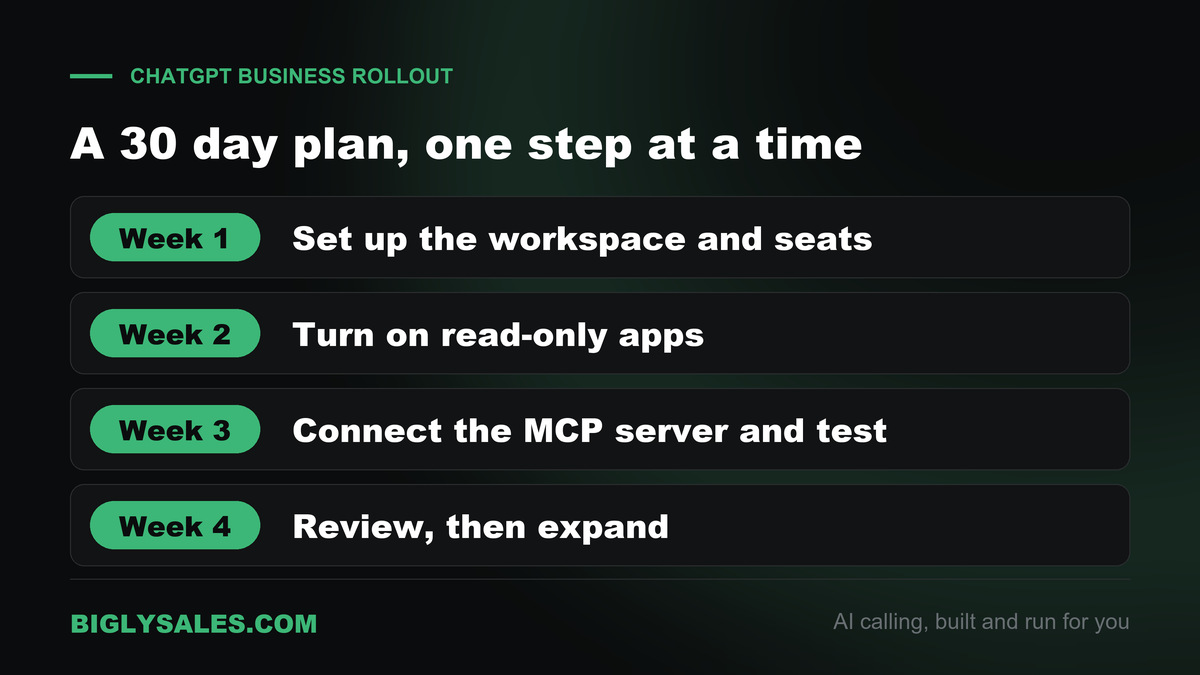
- Week one, set up the workspace. An owner creates the Business workspace, buys the seats and assigns Standard or Premium to each person. Name the owner and the admins, and write down who invites new members.
- Week two, turn on read-only apps. Enable only the apps your team needs, such as Gmail and Google Calendar, and set permissions to Allow read actions. Ask three people to try them on real work.
- Week three, connect the Bigly Sales MCP server. Have an admin add it, ask your Bigly team the questions above and test with fresh requests, one allowed and one that should be refused.
- Week four, review and expand. Check what people asked, what failed and what was confirmed. Turn on write actions for one app at a time, and only for tasks a person still reviews.
Privacy and data
OpenAI says ChatGPT Business is governed by its Business Terms and Enterprise Privacy commitments, and that it does not train on workspace data. By default, OpenAI also does not use content accessed through apps to train its models. Admins and owners cannot see all private member chats, and self-service data export is not available in Business workspaces.
Three limits to keep in mind. Information sent to a connected third-party service follows that provider’s own storage and privacy terms. Data residency covers stored customer content for supported features and does not mean every step stays in one region. And the Compliance Platform, with app activity records, is available only to eligible Enterprise and Edu workspaces.
Mistakes to avoid
- Buying one seat type for everyone. Give Premium to the few people who use it all day, and Standard to the rest.
- Leaving open seats. Members can invite others into open seats, so match seats to people.
- Turning on write actions on day one. Start read-only and widen in steps.
- Skipping the test with a fresh request. Check one item that should work and one that should be refused after every change.
- Connecting a server nobody has vetted. Custom apps are not verified by OpenAI.
- Assuming logs exist. App activity records depend on the plan and the app, so confirm before you rely on them.
Who this is wrong for
- A single person who wants an assistant for themselves. A personal plan fits better.
- Teams that want an AI to dial and talk to leads. ChatGPT Business does not place calls to your leads, so you need an AI calling platform for that.
- Organizations that need audit records of app activity or more than 200 seats. Look at ChatGPT Enterprise.
- Teams whose rules do not allow an outside AI tool until IT or legal clears it.
ChatGPT for sales teams FAQ
What can a sales team use ChatGPT for?
Sales teams use ChatGPT for work that is mostly writing and reading. That includes preparing for calls, drafting follow-up emails, summarizing call transcripts, cleaning up notes and practicing objections. A person should review anything before it reaches a prospect, because ChatGPT can be wrong and does not place calls to leads on its own.
What is ChatGPT Business?
ChatGPT Business is OpenAI’s self-serve workspace plan for teams. It gives an organization a shared workspace with centralized billing, admin controls and Standard or Premium seats. Both seat types include ChatGPT, ChatGPT Work and Codex. A workspace needs at least two paid seats.
Is ChatGPT Business the same as ChatGPT Team?
Yes. OpenAI renamed ChatGPT Team to ChatGPT Business on August 29, 2025. Existing Team workspaces became Business workspaces, and the rename itself did not change features, pricing or usage limits. Later changes to pricing and seat options are separate from the rename.
How much does ChatGPT Business cost?
Standard seats cost $25 per user per month on monthly billing or $20 billed annually. Premium seats cost $125 monthly or $100 billed annually. OpenAI says prices are in US dollars and may vary by country. They were checked on October 26, 2026, and a workspace needs at least two paid seats.
What is the difference between Standard and Premium seats?
Both include ChatGPT, Work and Codex. Premium seats include five times more usage than Standard seats and are not subject to a five-hour usage limit. A workspace can mix both types under one subscription, and only workspace owners can buy or change seat types.
Does OpenAI train its models on ChatGPT Business data?
OpenAI says it does not. ChatGPT Business is governed by OpenAI’s Business Terms and Enterprise Privacy commitments, and workspace content, including information accessed through apps, is not used to train its models by default. Information sent to a connected third-party service follows that provider’s own terms.
Can admins see my team’s chats?
Not by default. OpenAI says each member has their own chat history and chooses what to share, and admins and owners cannot see all private member chats. The Compliance Platform, which records app activity, is available only to eligible Enterprise and Edu workspaces.
Can ChatGPT Business connect to Bigly Sales?
Yes. Bigly Sales says its MCP server connects your account to ChatGPT, Claude and other MCP-compatible assistants, and OpenAI lists custom MCP connections as a Business feature. Your Bigly account manager gives you the setup details and walks you through the connection.
Who can add a custom MCP server in ChatGPT Business?
Only workspace admins and owners can create and publish custom MCP connections in a Business workspace. They open Plugins, add a custom MCP server and review a risk warning. OpenAI says custom MCP connections work on the web and not in the mobile apps.
How many people can use ChatGPT Business?
A workspace needs at least two paid seats. For subscriptions from August 24, 2026, OpenAI sets a maximum of 200 paid Standard and Premium seats in total. Larger teams are pointed to ChatGPT Enterprise, and workspaces created earlier keep their previous limit.
Should a sales team choose Business or Enterprise?
Business suits small and mid-sized teams that want a self-serve workspace with shared billing and admin controls. Enterprise adds role-based access, the Compliance Platform and contracted controls, and it covers deployments beyond 200 seats. Match the plan to team size and the controls your legal and IT teams require.
The bottom line
ChatGPT helps a sales team most with the writing and reading around a deal, such as call prep, follow-ups, summaries and practice. A person still checks every fact and promise before it reaches a prospect.
For a team, ChatGPT Business adds a shared workspace, clear roles and control over which apps ChatGPT can use. Roll it out in steps, starting with read-only access and one app at a time.
When you want an AI that makes the calls, connect your workspace to a platform that does. Bigly Sales runs the calling, and ChatGPT helps your team ask questions about the results.
Ready when you are
Run AI calls and ask ChatGPT about them
See plans and pricing for Bigly Sales, then connect your assistant to your calling data. Setup starts with a free 30-minute call, and your system is live within three business days.