

Qwen AI is Alibaba’s free AI assistant, and it is also a family of AI models that anyone can download.
That second part is why people keep searching for it.
When I checked Google Keyword Planner on November 13, 2026, “qwen ai” was getting between 10,000 and 100,000 US searches a month. Searches for “qwen 4” were up 9,900% year over year.
Qwen is free, and that is where a lot of people stop reading. There is one line in the terms that matters a lot if you run a business. I cover it below.
This guide explains what Qwen is, who runs it, what the app can do, what it costs, where your data goes and the three ways a business can use it. It is the tenth guide in our AI assistant series, after how to use Claude, ChatGPT for teams, how to use Gemini, how to use Copilot, how to use Perplexity, how to use DeepSeek, Meta Muse and Mistral Vibe.
Key Takeaways
- Qwen is two things from Alibaba, an AI assistant and a family of AI models.
- The assistant is free on the web, iPhone, Android, Mac and Windows.
- Its terms say the app is for private and non-commercial use only.
- A business has two other routes. Use the API from Alibaba Cloud, or run an open model yourself.
- Alibaba released Qwen3.8-27B under the Apache 2.0 license, which allows commercial use.
- The app is run by a Singapore company, and your inputs are processed by Alibaba Cloud in Singapore.
- You can opt out of model training by email.
Table of contents
- What Qwen AI is
- Who is behind Qwen
- What the Qwen app can do
- Where you can use Qwen
- The models inside Qwen right now
- What Qwen costs
- The rule to read before you use Qwen at work
- 3 ways a business can use Qwen
- Qwen’s open models in plain words
- Where your data goes and who trains on it
- 5 things to try in the Qwen app
- Qwen, MCP and Bigly Sales
- Who should skip Qwen
- Qwen vs ChatGPT vs DeepSeek
- Qwen AI FAQ
- The bottom line
What Qwen AI is
Qwen AI is an assistant you chat with, plus the AI models that power it.
The Qwen home page describes it as “an AI assistant for everyone, powered by the Qwen series models.” It adds that it is free to use and open to all.
So the name covers two things.
- The Qwen app. A chat assistant, like ChatGPT or Claude.
- The Qwen models. The engines underneath. Alibaba publishes several of them so other people can run and build on them.
Keep those two apart as you read. The rules for the app and the rules for the models are very different.
Who is behind Qwen
Qwen comes from Alibaba, the Chinese technology group. The footer of the Qwen site reads “Powered by Alibaba Cloud.”
The company you deal with as a user is a different name. The Qwen Service Agreement says your contract is with Nth Power Global Tech Singapore Pte. Ltd., a company set up in Singapore.
The same agreement says it is governed by Singapore law. Disputes go to arbitration in Singapore unless your region has its own terms.
That is a real difference from DeepSeek, which I covered in the DeepSeek guide. Both come from Chinese companies. The paperwork is not the same.
What the Qwen app can do
The Qwen app does much more than answer questions. Here is what its home page and its chat screen listed when I checked on November 13, 2026.
| Feature | What it does | A use for it |
|---|---|---|
| Chat | Answers questions and writes drafts | Explaining a contract term in plain words |
| Web search | Looks things up online before it answers | Checking today’s facts |
| Deep Research | Runs many searches and writes a report | Comparing two tools before you buy |
| Agent Mode | Plans a multi-step task and carries it out | A task with several steps |
| Web Dev | Builds a web page from a description | A quick landing page mockup |
| Create Image | Makes and edits images | A draft graphic for a flyer |
| Create Video | Makes short videos | A rough concept clip |
| File upload | Reads files, images, video and audio you attach | Summarizing a long PDF |
Qwen describes Deep Research as an agent that runs multi-step searches and writes a summary report. It says work that used to take hours can be done in a few minutes.
Treat that as the company’s claim. Check any report before you act on it.
Where you can use Qwen
You can use Qwen in a browser, on a phone or on a computer. The download page lists five places.
- On the web at chat.qwen.ai
- In the iPhone app from the App Store
- In the Android app from Google Play
- In a Mac app
- In a Windows app
The phone apps add voice conversations and questions about photos. The desktop apps can chat about your email, screenshots, files and what is on your screen.
Read that last line twice. A desktop app that can see your screen can see customer records too. Close them first.
The models inside Qwen right now
The Qwen app lets you pick which model answers you. On November 13, 2026, the picker showed three.
| Model | How Qwen describes it | When to pick it |
|---|---|---|
| Qwen3.7-Plus | The high-performance model in the Qwen3.7 series, for text and multimodal tasks | Everyday questions. It was the default |
| Qwen3.8-Max | The flagship of the Qwen3.8 line | Harder writing and reasoning |
| Qwen4-Max-Preview | A preview of the flagship Qwen4 model | Trying the newest model, knowing it may change |
You do not need to study these. Start with the default. Switch to a Max model when an answer feels thin.
The list changes often. Alibaba ships new Qwen versions every few months, so check the picker itself.
What Qwen costs
The Qwen app is free. Its home page says so in plain words.
There is one thing to watch. The Service Agreement has a full section on subscriptions, plans and fees, with payments through Apple, Google or Stripe. So paid plans exist or are planned.
I did not find a public price list on the Qwen site on November 13, 2026. I will not guess at numbers. If the app offers you a paid plan, the price on your screen is the one that counts.
| Way to use it | Cost | Who pays |
|---|---|---|
| Qwen app | Free to use | Nobody, unless you choose a paid plan |
| Qwen API from Alibaba Cloud | Pay for what you use | Your business, by usage |
| Open Qwen models | Free to download | You pay for the hardware and the person who runs it |
The rule to read before you use Qwen at work
The free Qwen app is for personal use only. That comes straight from its terms.
The Service Agreement, effective September 10, 2026, says this.
“The Services are for private and non-commercial use only.”
So if you paste a customer list into the free app to write follow-up emails, you are outside the terms you agreed to.
I am not a lawyer, and terms change. Read the current version yourself before you decide. But the plain reading is clear. The app is for you as a person. It is not a work tool.
This does not make Qwen useless for a business. It means a business should use one of the other two routes.
3 ways a business can use Qwen
There are three routes, and each has its own rules.
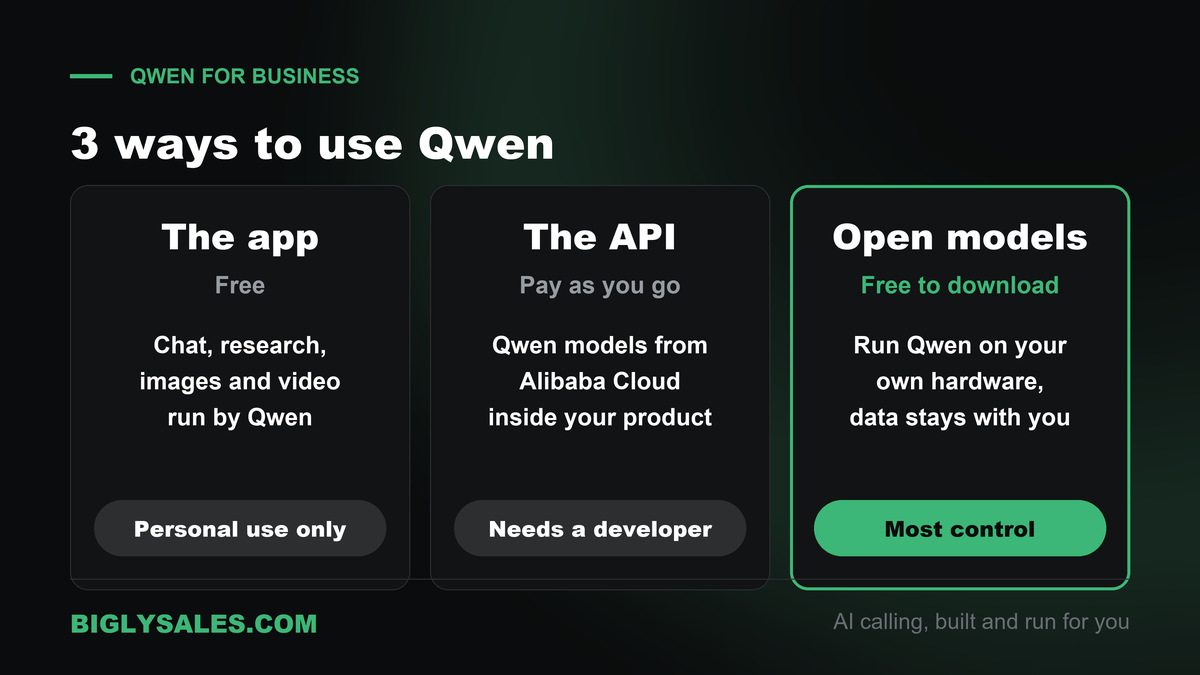
| Route | Who runs it | Rules that apply | What you need |
|---|---|---|---|
| The Qwen app | Qwen, in Singapore | Personal and non-commercial use only | An account |
| The API from Alibaba Cloud | Alibaba Cloud | Alibaba Cloud’s own business terms | A developer and a cloud account |
| An open model you host | You | The model’s license, such as Apache 2.0 | Hardware and a technical person |
1. The app, for learning
Use the free app to learn what Qwen is good at. Keep it to your own questions and public information.
2. The API, for building
The Qwen site says its API uses a format compatible with the OpenAI API. In plain words, a developer who has built on ChatGPT’s API can switch with small changes.
This route runs through Alibaba Cloud and has its own terms. Have whoever handles your contracts read them before any customer data goes in.
3. An open model, for control
This is the route that makes Qwen different. You download a model, run it on your own machine, and your data never leaves your building.
It takes real technical skill. The next section explains what you get.
Qwen’s open models in plain words
An open model is an AI model the maker lets you download and run yourself.
Most well-known assistants do not work this way. You rent them. With an open model, you hold a copy.
Alibaba does a lot of this. In an August 17, 2026 post, Alibaba Cloud said it has open-sourced more than 460 models, and that they have been downloaded more than 3 billion times.
The one to know is Qwen3.8-27B. Here is what Alibaba and the model’s page on Hugging Face say about it.
- It is released under the Apache 2.0 license. That license allows commercial use.
- It reads images and video as well as text.
- It can run on consumer hardware. Alibaba says a compressed version can run on a laptop.
- It works with common tools for running models, including Ollama and LM Studio.
Not every Qwen model has the same license. Alibaba also released the weights of its much larger Qwen3.8 flagship, and that one comes with separate terms. Read the license on each model’s page before you build on it.
Why would a business bother? Three reasons come up most.
- Privacy. Customer data stays on your own machines.
- Cost control. You pay for hardware, not per message.
- No lock-in. Nobody can change the price or retire the model you depend on.
The trade is work. Someone has to install it, secure it and keep it updated. For a five person company with no IT help, that is usually too much.
Free setup, live fast
Skip the build and get calls going
Bigly Sales runs fully managed AI calling for inbound and outbound, with live transfer to your team. You get a free 30-minute setup, a $1,000 value, and most teams go live within 24 hours.
Where your data goes and who trains on it
This section is about the Qwen app. If you host an open model yourself, your data stays with you.
All of this comes from the Qwen privacy policy, effective September 7, 2026, and the Service Agreement.
| Question | What Qwen’s documents say |
|---|---|
| Who is responsible for my data? | Nth Power Global Tech Singapore Pte. Ltd., a Singapore company |
| Who processes what I type? | Alibaba Cloud (Singapore) Private Limited, as the technology provider |
| Does that provider keep my input? | The policy says it deletes your input promptly after the answer is generated |
| Where is my data stored? | On servers that include ones in Singapore. It may also be moved outside your country |
| Is my content used for training? | De-identified content and feedback may be. Raw input is not used directly |
| Can I opt out of training? | Yes, by emailing [email protected] |
| Does it remember me? | A Memory feature keeps details from past chats to personalize answers |
Two notes on that table.
First, the opt out is by email, not a switch in settings. That is slower than most assistants in this series. Send the email on day one.
Second, feedback is treated differently. The agreement says that if you rate an answer with a thumbs up or down, that feedback can still be used for training after you opt out.
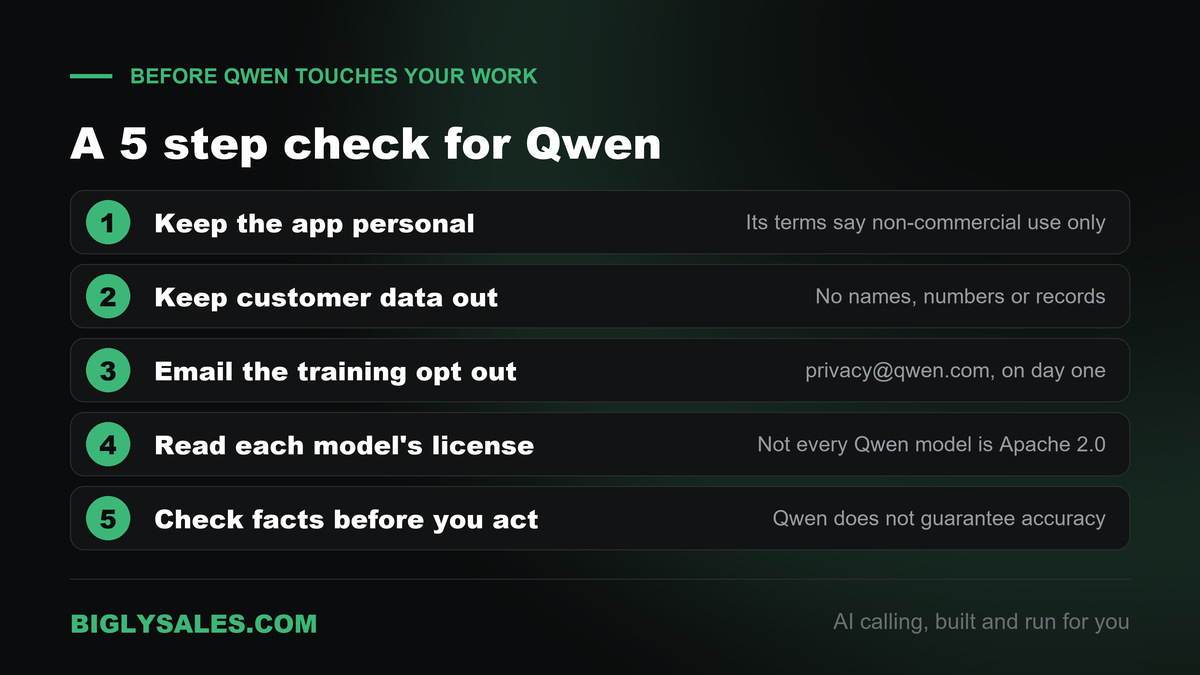
Here is my short checklist before Qwen goes anywhere near your work.
- Keep the free app for personal use, as its terms say.
- Keep customer names, phone numbers and records out of it.
- Email the training opt out.
- Read the license before you build on any open model.
- Check facts before you act. The agreement itself says Qwen cannot guarantee its answers are accurate.
5 things to try in the Qwen app
These are safe ways to learn what Qwen can do. None of them needs customer data.
| What to test | Prompt to try | Turn on |
|---|---|---|
| Research | Compare the three most common ways small businesses answer calls after hours. List every source you used. | Deep Research |
| Plain words | Explain what an Apache 2.0 license allows, as if I have never read a software license. | Chat |
| Fresh facts | What did Alibaba announce about Qwen this month? Give dates and links. | Web search |
| A quick page | Build a simple one page site for a local plumber with a phone number at the top and a quote form. | Web Dev |
| A long file | Summarize this public report in 10 bullet points and list anything that needs a second look. | File upload |
Run the same prompts in the assistant you use today. You will see fast where Qwen is ahead and where it is behind.
Qwen, MCP and Bigly Sales
MCP, the Model Context Protocol, is an open standard that lets an AI assistant talk to other software. Our guide to MCP servers for AI calling explains it in plain words.
Qwen supports MCP on the developer side. I found it in three places.
| Product | What the source says | Who it is for |
|---|---|---|
| Alibaba Cloud API | Qwen models accept MCP servers through one API, up to 10 servers | Developers building a product |
| Qwen Code | An open-source coding tool that lists MCP as a built-in feature | Developers |
| Qwen-Agent | An open-source framework with MCP support | Developers building agents |
The details are in Alibaba Cloud’s MCP docs, and in the pages for Qwen Code and Qwen-Agent.
What about the everyday Qwen app? The public pages I read do not describe an MCP or connector setting for it. Some blogs say the desktop app has one. I could not confirm that at the source, so I am leaving it out.
The Bigly Sales MCP server brings your calling data into an AI assistant. It works with ChatGPT, Claude and other MCP assistants, and the assistant sees only what your Bigly account is allowed to see.
The connection details are not public. Your Bigly account rep walks you through them during your free setup. If Qwen is on your list, bring these questions.
- Which assistant should we connect first for our team?
- If we use a Qwen model, where will our calling data be processed?
- Which tools only read data and which can change it?
- How fast can access be removed if someone leaves?
Who should skip Qwen
- Owners who want one assistant for daily work with customer data. The free app’s terms rule that out.
- Teams with no technical help. The API and the open models both need a developer.
- Businesses whose contracts name approved vendors. Check the list before you add a new one.
- Teams that live in Google Workspace or Microsoft 365. Our Gemini guide and Copilot guide fit better.
- Anyone who wants AI to call leads. Qwen does not place phone calls. That is a calling platform’s job.
Qwen vs ChatGPT vs DeepSeek
People search for these comparisons a lot, so here is the short version for a business owner.
| Assistant | Made by | Stands out for | Watch out for |
|---|---|---|---|
| Qwen | Alibaba, China, with the app run from Singapore | A free app and open models you can run yourself | App terms limit it to personal use |
| ChatGPT | OpenAI, United States | Business plans with admin controls | Paid per seat |
| DeepSeek | DeepSeek, China | Low API prices and open models | Its policy says data is stored in China |
| Mistral Vibe | Mistral AI, France | EU data hosting by default | Training is on by default on personal plans |
My read is simple. Qwen is a strong pick if you want to run a model yourself. For a shared work assistant with a clear business plan, ChatGPT or Claude is the easier road.
Qwen AI FAQ
What is Qwen AI?
Qwen AI is two things from Alibaba. It is a free AI assistant you can chat with on the web, on your phone and on your computer. It is also a family of AI models, and Alibaba gives several of them away for anyone to download and run. The assistant runs on those same models.
Who owns Qwen?
Qwen comes from Alibaba, the Chinese technology group, and its site says it is powered by Alibaba Cloud. The app itself is run by a Singapore company named Nth Power Global Tech Singapore Pte. Ltd., which is the company you make an agreement with when you sign up, according to the Qwen Service Agreement.
Is Qwen AI free?
Yes. The Qwen home page says the assistant is free to use and open to all. The Service Agreement also has a section on paid subscriptions, but I did not find a public price list on the Qwen site when I checked on November 13, 2026. The open models are free to download. You pay only for the computer you run them on.
Can I use Qwen for my business?
Not through the free app, going by its own terms. The Qwen Service Agreement says the service is for private and non-commercial use only. A business has two other routes. You can use Qwen models through Alibaba Cloud’s API, which has its own terms, or you can run an open Qwen model on your own hardware.
Is Qwen safe to use?
It depends on what you put in it. For personal questions with no private details, the risk is low. For work, slow down. The terms limit the app to personal use, your inputs are processed by Alibaba Cloud in Singapore, and de-identified content can be used for training unless you opt out by email. Keep customer data out of it.
Does Qwen train on my chats?
It can, in a limited form. The Qwen privacy policy says the company may use de-identified user content and feedback to train and improve its models, and that it will not use your raw input to directly train AI models. The Service Agreement says you can opt out of model training by emailing [email protected].
What is Qwen 4?
Qwen 4 is the next generation of Alibaba’s models. On November 13, 2026, the Qwen model picker listed Qwen4-Max-Preview and described it as a preview of the flagship Qwen4 model. A preview is an early version, so expect changes. Searches for it are climbing fast. Google Keyword Planner showed US searches for qwen 4 up 9,900% year over year.
Can I run Qwen on my own computer?
Yes, with the open models. Alibaba released Qwen3.8-27B under the Apache 2.0 license, and says it can run on consumer hardware, even a laptop in a compressed form. Its model page points to tools like Ollama and LM Studio for that. You will want someone technical to set it up and keep it running.
Does Qwen support MCP?
On the developer side, yes. Alibaba Cloud’s docs say Qwen models accept MCP servers through one of its APIs, up to 10 at a time. Qwen Code, the coding tool, lists MCP as a built-in feature. For the everyday Qwen app, the public pages I read do not describe an MCP setting, so I would not count on one there.
Can Qwen connect to Bigly Sales?
Bigly Sales has an MCP server that brings your calling data into an AI assistant, and Qwen models can use MCP servers through Alibaba Cloud. The connection details are not public, so ask your Bigly account rep during your free setup call. They will tell you which setup fits your account and what data the assistant can reach.
The bottom line
Qwen AI is a capable free assistant and a generous set of open models. Use the app to learn, keep customer data out of it, and send the training opt out. If you want Qwen inside your business, go through the API or host an open model with someone technical.
And remember what no assistant on this list does. It will not pick up the phone. When you want AI that calls, qualifies and transfers live to your team, with consent and calling windows checked before every dial, pair your assistant with a calling platform built for that.
Ready to talk
Let AI make the calls your assistant can’t
Bigly Sales plans start at $99 a month for inbound and outbound AI calling. Book a call and we will map a plan to your call volume and show you how the MCP connection works.