

Meta Muse is a personal AI agent from Meta that does tasks for you instead of only answering questions.
It reads your email. It checks your ad results. It drafts the reply and waits for your OK.
And people are looking it up fast. When I checked Google Keyword Planner on November 9, 2026, US searches for “meta muse” were up 9,900% in three months. Searches for “meta ai app” were down 90% over the same stretch.
So what is it, and is it worth your time as a business owner?
This guide covers what Muse is, how it differs from Meta AI, what it costs, how to set it up, the business tools it connects to, 7 jobs to hand it and how to keep your data safe. It is the eighth guide in our AI assistant series, after how to use Claude, ChatGPT for teams, how to use Gemini, how to use Copilot, how to use Perplexity and how to use DeepSeek.
Key Takeaways
- Muse is an agent. It does tasks across your connected apps, with your approval.
- Meta AI is the chat assistant inside WhatsApp and Instagram. Muse is a separate app.
- Muse is free with limits. Paid plans cost $20 and $100 a month.
- It connects to 15 business tools, including Slack, QuickBooks, Shopify and HighLevel, plus your Meta ad accounts.
- Meta says nothing publishes, sends or spends without your approval.
- Your Muse chats are not used for ads. Training is on by default, and you can switch it off.
- Muse is live in the US, Canada and Singapore so far.
Table of contents
- What Meta Muse is
- Muse vs Meta AI and what happened to Llama
- Where you can use Muse
- Muse plans and prices
- How to set up Muse for your business
- The business tools Muse connects to
- 7 business jobs to hand Muse
- Prompts to try in your first week
- Is Muse safe for business data
- Muse, MCP and Bigly Sales
- Who should wait on Muse
- Muse vs ChatGPT vs Claude for business
- Meta Muse FAQ
- The bottom line
What Meta Muse is
Meta Muse is a personal AI agent made by Meta Superintelligence Labs. You give it a goal, and it works on that goal across the apps you connect.
That is the big difference from a chatbot.
A chatbot answers your question and stops. An agent keeps going. Muse can search your inbox, open a spreadsheet, check a calendar and come back with a draft. It can also keep working in the background after you close the app.
Each user gets a private cloud computer for Muse. Your logins and payment details sit in a locked store, away from the agent itself, according to Meta.
It caught on quickly. Sensor Tower data reported by PPC Land put Muse at 10 million US downloads in its first 40 days.
Muse vs Meta AI and what happened to Llama
This is where most people get lost. Meta now has two AI products with similar names.
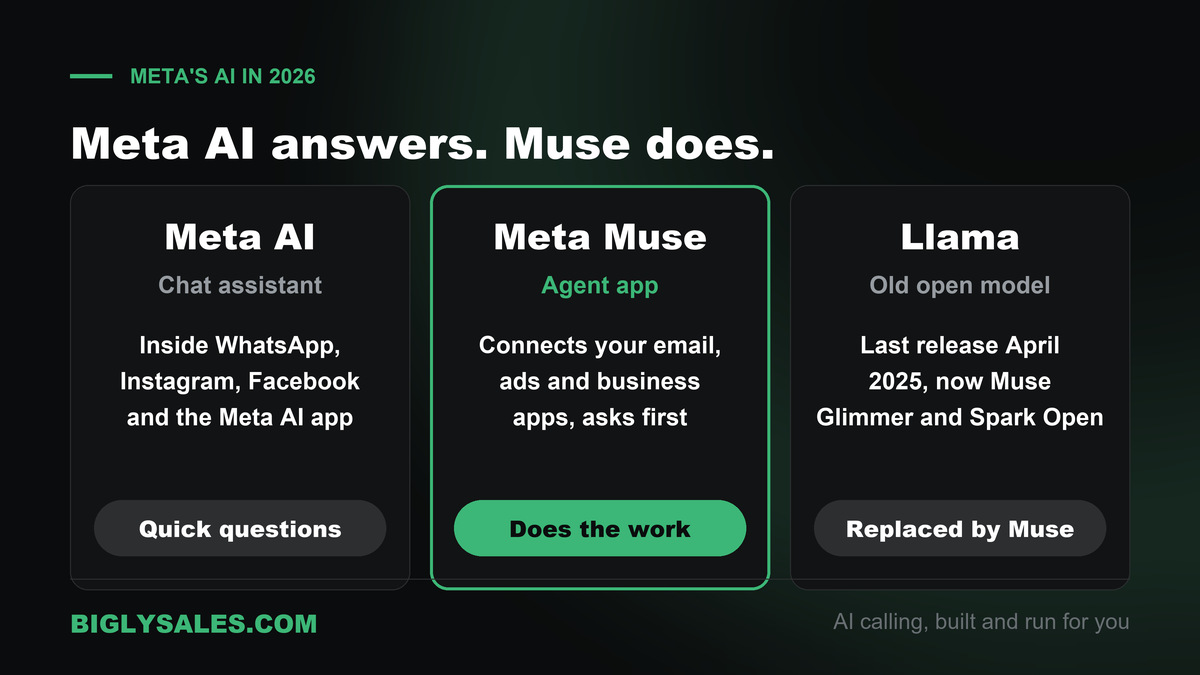
| Meta AI | Meta Muse | |
|---|---|---|
| What it is | A chat assistant | An agent that does tasks |
| Where you find it | WhatsApp, Instagram, Facebook, Messenger and the Meta AI app | The Muse app on iPhone, Android and Mac, muse.ai and WhatsApp |
| Connects to your tools | No | Yes, through connectors |
| Launched | 2023, rebuilt on Muse Spark in April 2026 | September 2026 |
| Good for | Quick questions and images | Ongoing work across email, ads and business apps |
And Llama? For years, Llama was Meta’s open AI model that anyone could download.
In April 2026, Meta launched Muse Spark, a closed model that now runs the Meta AI app. Press coverage treated it as the end of the Llama line, and no new Llama model has shipped since Llama 4 in April 2025.
Meta did not stop sharing models, though. In August 2026 it released Muse Glimmer, a smaller open model under the Apache 2.0 license. In October it added Muse Spark Open, a very large open model under Meta’s own license.
Even the old llama.com address now sends you to Meta’s developer site, which lists Muse models only.
For a business owner, the short version is simple. Meta AI answers. Muse does.
Where you can use Muse
Muse launched in the United States on September 8, 2026. Meta’s small business announcement says it is available in the US and Canada, and Singapore followed on October 27.
You can use it in four places.
- The Muse app on iPhone and Android
- The website at muse.ai
- The Mac app
- Inside WhatsApp
New features land in the US first. Voice chat with an animated avatar started rolling out on November 5, 2026, in the US only.
Outside those countries, you will still see Meta AI inside WhatsApp and Instagram. That is the chat assistant, not the agent.
Muse plans and prices
Muse is free for most everyday use. Heavy users pay for a bigger weekly allowance. These come from Meta’s Muse subscription page, checked November 9, 2026.
| Plan | Price | Weekly allowance | Good for |
|---|---|---|---|
| Free | $0 | Limited, refreshes over time | Trying it out, light use |
| Power | $20 a month | 500 million Muse tokens | An owner using it every day |
| Maximum | $100 a month | 3 billion Muse tokens | Long running tasks and heavy use |
A token is a small chunk of text. Long tasks, like reading a month of email, use more of them.
My advice is to start free. Upgrade only when you keep hitting the limit.
How to set up Muse for your business
Setup takes about as long as setting up a new phone app. Here is the order I would follow.
- Get the app. Download Muse or go to muse.ai and sign in with your Meta account.
- Turn off training if you want. Go to Settings, then Data controls, and switch off “Help improve our AI models.”
- Connect one tool first. Ask Muse “Connect my Gmail” or open Settings, then Connectors, and tap Connect.
- Pick read only where you can. Many connectors can be limited to reading data, with no actions.
- Keep approvals on. By default Muse asks before important actions like sending an email. Leave it that way for now.
- Give it one small job. Something you can check in five minutes. More on that below.
Your Facebook, Instagram and Threads accounts connect on their own if they sit in the same Meta Accounts Center. Check what is linked before your first task.
Full steps are in Meta’s help page on connectors.
The business tools Muse connects to
On September 29, 2026, Meta launched Muse for Small Business. It added business skills and a set of connectors.
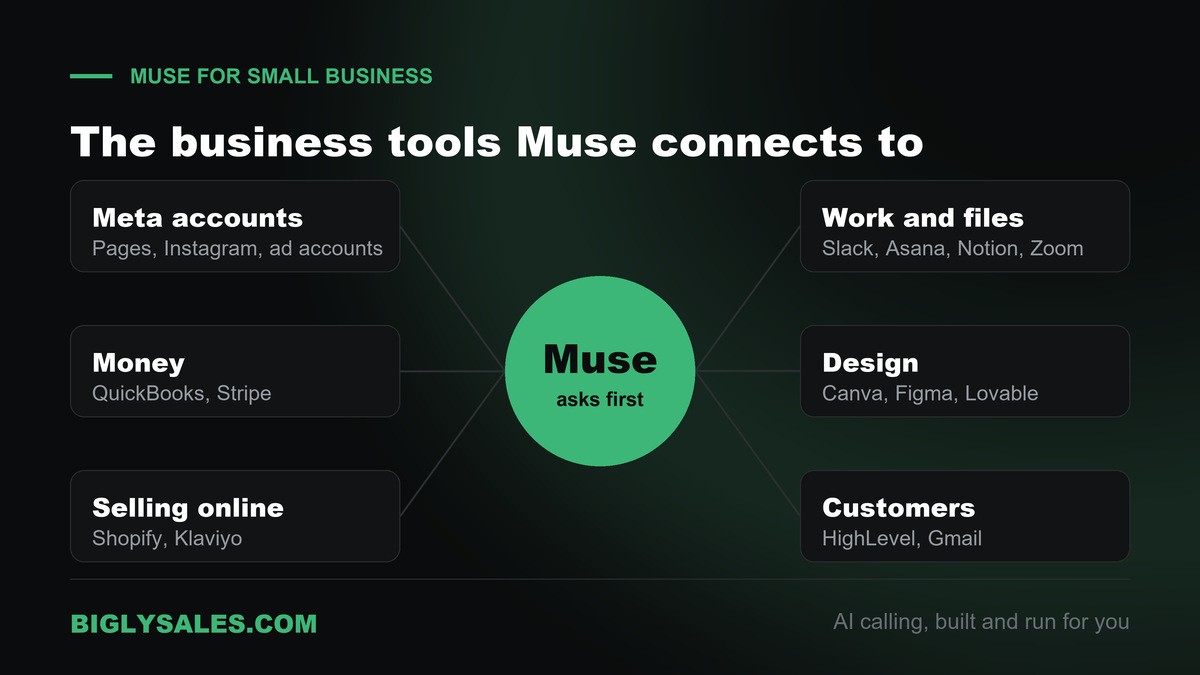
| Group | Tools | What Muse can help with |
|---|---|---|
| Meta accounts | Facebook Pages, Instagram professional analytics, Meta ad accounts | Post and ad results, campaign drafts |
| Money | Intuit QuickBooks, Stripe | Monthly numbers, odd expenses, payments |
| Selling online | Shopify, Klaviyo | Store sales, email campaigns |
| Work and files | Slack, Asana, Notion, Box, Dropbox, Zoom, Granola | Messages, tasks, docs, meeting notes |
| Design and building | Canva, Figma, Lovable | Designs and simple app builds |
| Customer tools | HighLevel | Contacts and follow-ups |
Gmail and your calendar connect too. And if a tool is missing, you can ask Muse to build a custom connector.
One warning on that. Meta says it does not review custom connectors or how they use your data. Read the other company’s privacy policy before you hand over access.
Free setup, live fast
Turn Muse’s follow-up list into booked calls
Bigly Sales runs fully managed AI calling for inbound and outbound, with live transfer to your team. You get a free 30-minute setup, a $1,000 value, and most teams go live within 24 hours.
7 business jobs to hand Muse
Every job below comes from Meta’s own examples or the tools Meta lists. Start with one. Add the next when the first one works.
1. Clear your inbox
Muse flags emails that need a reply and writes a first draft. You read it, fix it and hit send. Or ask it to wait.
2. Review your ads
Connect your Meta ad account and ask what is working. Muse can draft a new campaign too. Nothing goes live or spends money until you approve it.
3. Check the monthly numbers
With QuickBooks connected, ask Muse to review last month and flag anything unusual. It is a second pair of eyes, not your accountant.
4. Build a growth plan
Meta’s own example is asking Muse to look at your sales and campaigns and suggest a plan. Shopify, Stripe and your ad account give it the numbers.
5. Turn meetings into tasks
Connect Zoom or Granola for notes and Asana or Notion for tasks. Ask Muse to pull the action items from yesterday’s call and list them.
6. Watch your social accounts
Ask which Instagram posts got the most saves this month and why. Then ask for three ideas in the same style.
7. Turn a big goal into a weekly plan
Tell Muse what you want done this quarter. It breaks it into steps, sets reminders and checks in.
Prompts to try in your first week
Copy these and swap in your own business. Each one is small enough to check in a few minutes.
| Job | Prompt to try | Connect first |
|---|---|---|
| Inbox | Find emails from customers this week that still need a reply and draft each one. Do not send. | Gmail |
| Ads | Compare my last three Meta ad campaigns. Which one got leads cheapest, and why do you think so? | Meta ad account |
| Money | Look at last month in QuickBooks and list any expense that looks higher than usual. | QuickBooks |
| Store | What were my top five products on Shopify last month, and what changed from the month before? | Shopify |
| Meetings | Pull the action items from my last three Zoom calls and add them to Asana as draft tasks. | Zoom, Asana |
| Social | Which of my Instagram posts this month got the most saves? Give me three post ideas like them. |
Notice the words “do not send” and “draft.” Keep them in your prompts until you trust the results.
Is Muse safe for business data
Read the Muse privacy policy before you connect anything with customer data in it. It took effect September 17, 2026. Here is what stands out.
- Ads. Muse does not share your conversations or Muse computer data with Meta’s ad systems.
- Training. Your chats may train Meta’s models, and the setting is on by default. You can turn it off, and that covers past chats too.
- Storage. Your data lives in a separate cloud computer for each user. The policy does not name a country.
- Deleting. You can delete chats or reset Muse. It may still remember things it learned, so use the forget feature for names or topics.
- Approvals. Muse asks before sensitive actions like sending email or buying something.
Here is my short checklist before you connect a business tool.
- Turn training off.
- Start with read only access.
- Keep approvals on for sending, posting and spending.
- Skip custom connectors until you have read the other company’s policy.
- Check your customer contracts. Some limit which tools can touch their data.
Muse, MCP and Bigly Sales
MCP, the Model Context Protocol, is an open standard that lets an AI assistant talk to other software. Our guide to MCP servers for AI calling explains it in plain words.
Here is where Muse stands today.
- In the Muse app. Meta’s help pages do not mention MCP. Muse uses its own connectors and custom connectors instead.
- For developers. Meta says its Muse Spark model works with new MCP servers through the Meta Model API, which is in public preview.
- For ads. Meta also runs its own MCP connection so Claude and ChatGPT can work with Meta ad accounts. Meta announced that in April 2026.
The Bigly Sales MCP server brings your calling data into an AI assistant. It works with ChatGPT, Claude and other MCP assistants, and the assistant sees only what your Bigly account is allowed to see.
Bigly is not on Muse’s connector list today. If you want your call data in Muse, ask your Bigly account rep during your free setup. They will tell you the right route for your account.
Bring these questions.
- Which assistant should we connect first for our team?
- Which tools only read data and which can change it?
- Can we limit the connection to totals and reports, with no contact details?
- How fast can access be removed if someone leaves?
Who should wait on Muse
- Businesses outside the US, Canada and Singapore. You cannot get it yet.
- Teams that live in Google Workspace or Microsoft 365. Our Gemini guide and Copilot guide fit better.
- Teams that need admin controls for many seats. Muse is built for one person’s account today.
- Businesses whose contracts limit where customer data can go.
- Anyone who wants AI to call leads. Muse does not place phone calls to your leads. That is a calling platform’s job.
Muse vs ChatGPT vs Claude for business
All three can write. The real difference is what each one connects to and who it is built for.
| Assistant | Built as | Stands out for | Good fit for |
|---|---|---|---|
| Meta Muse | A personal agent | Acting on Meta ads, Facebook, Instagram and connected business apps | Owners who run on Meta’s apps |
| ChatGPT | A chat assistant and team workspace | A broad assistant with admin controls for teams | Teams that want one shared assistant |
| Claude | A chat assistant and coding agent | Long documents, careful writing and coding help | Teams that write a lot or build their own tools |
| Gemini and Copilot | Assistants inside office suites | Working inside email and docs | Teams on Google or Microsoft |
Plenty of businesses use two. Muse for Meta ads and the inbox. Another assistant for long writing.
Meta Muse FAQ
What is Meta Muse?
Meta Muse is a personal AI agent from Meta. Unlike a chatbot that only answers, Muse carries out tasks. It can read your connected email and calendar, review ad results, draft replies and keep working on a goal in the background. It runs in its own app on iPhone, Android and Mac, on muse.ai and inside WhatsApp. Meta launched it in September 2026.
Is Meta Muse the same as Meta AI?
No. Meta AI is the assistant you chat with inside WhatsApp, Instagram, Facebook, Messenger and the Meta AI app. Since April 2026 it runs on Meta’s Muse Spark model. Muse is a separate agent app that connects to your tools and does work for you. Same company and the same family of models, but a different product.
Is Meta Muse free?
Yes, Muse has a free tier with a usage limit. When you hit it, you can wait for the allowance to refresh or upgrade. Meta lists two paid plans. Power costs $20 a month for 500 million Muse tokens a week, and Maximum costs $100 a month for 3 billion Muse tokens a week. Meta notes benefits may vary by region.
Is Muse available in my country?
Muse launched in the United States, and Meta’s small business announcement says it is available in the US and Canada. Meta added Singapore on October 27, 2026. New features such as voice often reach the US first. If you are somewhere else, check muse.ai or the app store in your country before you plan around it.
What business tools does Muse connect to?
Meta names Asana, Box, Canva, Dropbox, Figma, Granola, HighLevel, Intuit QuickBooks, Klaviyo, Lovable, Notion, Shopify, Slack, Stripe and Zoom, plus Facebook Pages, Instagram professional account analytics and Meta ad accounts. Gmail is also listed in Meta’s help pages. For anything else, you can ask Muse to build a custom connector.
Can Muse send emails or spend money without asking?
Not by default. Meta says Muse asks for your approval before important actions such as sending an email, and its small business post says nothing publishes, sends or spends without your approval. You can change when it asks in settings, and many connectors can be set to read data only. Keep the approvals on while you learn how it works.
Does Meta use my Muse chats for ads or training?
Not for ads. The Muse privacy policy says your conversations and Muse computer data are not shared with Meta’s ad systems. Training is different. It is switched on by default. Turn it off under Settings, then Data controls, and the change also covers past chats. Meta says it strips details like names and phone numbers before training.
Does Meta Muse support MCP?
Meta’s help pages for the Muse app do not mention MCP. The app offers custom connectors instead, which Muse builds by asking for a service’s API details. On the developer side, Meta says its Muse Spark model works with new MCP servers through the Meta Model API, which is in public preview.
Can Muse connect to Bigly Sales?
Not through a listed Muse connector today. Bigly Sales has an MCP server that works with ChatGPT, Claude and other MCP assistants. If you want your call data in Muse, ask your Bigly account rep during your free setup call. They will tell you the right route for your account and what data it can reach.
Should my business use Muse, ChatGPT or Claude?
Pick by where your work lives. Muse makes sense if your business runs on Facebook, Instagram and Meta ads and you want an agent that acts on them. ChatGPT and Claude are stronger picks for long writing, team workspaces and admin controls. Plenty of teams use two. None of them places calls to your leads.
The bottom line
Meta Muse is Meta’s AI agent for getting work done across your email, ads and business apps. Start on the free plan, turn training off, connect one tool and keep approvals on.
Muse can tell you which leads need a follow-up. It will not pick up the phone. When you want AI that calls, qualifies and transfers live to your team, with consent and calling windows checked before every dial, pair your assistant with a calling platform built for that.
Ready to talk
Let AI make the follow-up calls Muse lists
Bigly Sales plans start at $99 a month for inbound and outbound AI calling. Book a call and we will map a plan to your call volume and show you how the MCP connection works.