

DeepSeek is a free AI chatbot and a family of open AI models made by a company in Hangzhou, China.
It is fast. It is cheap. And it writes as well as tools that cost a lot more.
So your reps are probably already using it.
Here is the problem. Where your data goes depends on how you run DeepSeek. Paste a call transcript into the app and it lands on servers in China. Run the open model on your own servers and nothing leaves the building.
This guide shows you how to use DeepSeek for sales without putting customer data at risk. You get the three ways to run it, what the privacy policy really says, a 7 point check, API prices, prompts and how to connect Bigly Sales. It is the seventh guide in our series, after how to use Claude, ChatGPT for sales teams, how to use Gemini, how to use Copilot, how to use Grok and how to use Perplexity.
Key Takeaways
- DeepSeek runs three ways. The app, the API and open weights you host yourself.
- The app and the API store data in China, per DeepSeek’s own privacy policy.
- The open weights are MIT licensed. Self hosted, your data never reaches DeepSeek.
- The API is very cheap. Flash costs $0.30 per million input tokens at peak.
- DHS removed DeepSeek from federal civilian systems on October 20, 2026.
- Use the free app only for work with no customer data in it.
- Bigly Sales connects through an MCP tool that runs DeepSeek as its model.
Table of contents
- What DeepSeek is
- Three ways to use DeepSeek
- Is DeepSeek safe for sales data
- Why the US government pulled it from federal systems
- The 7 point check before sales data goes in
- What DeepSeek is good for in sales
- DeepSeek API prices
- How to set up DeepSeek the safe way
- Sales prompts that need no customer data
- How to use DeepSeek with an MCP server
- Who should skip DeepSeek
- DeepSeek vs the other assistants in this series
- How to use DeepSeek FAQ
- The bottom line
What DeepSeek is
DeepSeek is an AI assistant and a set of large language models from Hangzhou DeepSeek Artificial Intelligence Co., Ltd. You chat with it on the web or in the phone app, or developers call it through an API.
Two models matter right now. DeepSeek V4.1 Flash, the fast everyday model, and DeepSeek V4 Pro, the bigger one. Both read up to 1 million tokens at once. That is a few thick books in one go.
The latest Flash update shipped on October 17, 2026, per DeepSeek’s change log. The web chat and the app moved to it the same day.
What makes DeepSeek different from ChatGPT or Claude is simple. It gives the model away. Anyone can download it and run it.
Three ways to use DeepSeek
This is the part most guides skip. And it is the part that decides whether DeepSeek is safe for you.
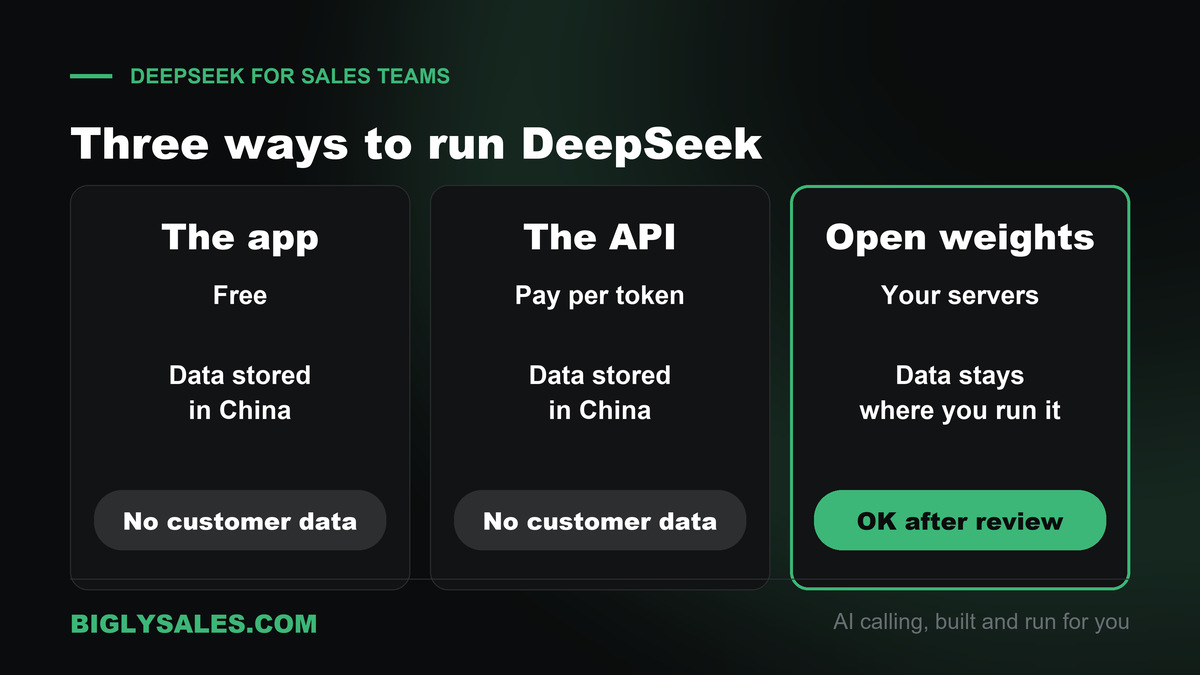
| Way to run it | Cost | Where your data goes | Fine for customer data |
|---|---|---|---|
| DeepSeek app and web chat | Free, no paid plan listed | DeepSeek servers in China | No |
| DeepSeek API | Pay per token | DeepSeek servers in China | No |
| Open weights you host | Your own servers or cloud bill | Wherever you run it | Yes, with your normal security review |
Same model. Very different risk.
I think about it like a rental car versus your own car. The model is the engine. Who holds the keys is what matters.
Is DeepSeek safe for sales data
Read DeepSeek’s privacy policy before anyone on your team pastes a lead list. It was last updated February 10, 2026. Four lines stand out.
- Location. DeepSeek says it collects, processes and stores your personal data in the People’s Republic of China.
- What it keeps. Text and voice input, prompts, uploaded files, photos, feedback and chat history.
- Training. It uses that data to train and improve its models. You can opt out, but by emailing [email protected], not by flipping a switch.
- How long. As long as you have an account.
And the terms of use, updated March 27, 2026, fall under the laws of mainland China.
None of that means DeepSeek is a bad model. It means the app and the API are the wrong place for a customer’s name, number or call recording.
A sales team handles exactly that kind of data all day. Consent records. Call transcripts. Notes about who is buying what.
Why the US government pulled it from federal systems
On October 20, 2026, the Department of Homeland Security published an order in the Federal Register.
It does two things. It bars federal civilian agencies from buying DeepSeek products. And it removes DeepSeek products from their systems, including third party products built using DeepSeek.
It is not a ban on private businesses. You can still use DeepSeek.
But if you sell to federal agencies, or your customers do, read that order with your contracts open. A tool built on DeepSeek may be a problem for them even if it is fine for you.
The 7 point check before sales data goes in
Run this list once, write down the answers and share them with your team.
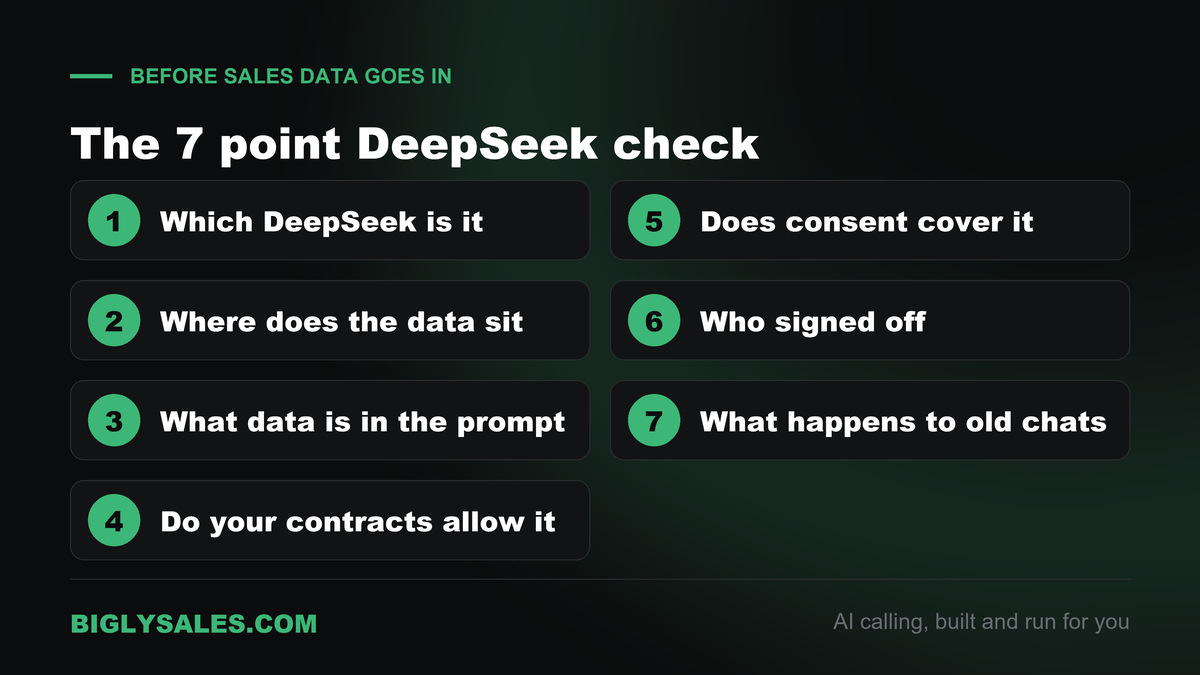
- Which DeepSeek is it? The app, the API or open weights you host. Write it down.
- Where does the data sit? If the answer is DeepSeek’s servers, it sits in China.
- What data is in the prompt? Public facts and your own scripts are fine. Names, numbers, emails and transcripts are not.
- Do your contracts allow it? Some customer contracts limit where their data can go. Government work often does.
- Does your consent language cover it? If a caller agreed to share data with you, that is not the same as sharing it abroad.
- Who signed off? Get a yes from whoever owns security or legal. One name, in writing.
- What happens to old chats? Delete chat history you do not need, and set a date to check again.
If you cannot answer all seven, keep DeepSeek on public data only. That still leaves plenty to do with it.
What DeepSeek is good for in sales
Here is the good news. A lot of sales work has no customer data in it at all.
- Scripts. First drafts of cold call openers, voicemail lines and follow-up texts.
- Objections. Ten ways a dental office might say no, and a short answer to each.
- Industry primers. How a roofing company makes money and what keeps its owner up at night.
- Training. Role play a tough buyer so a new rep can practice.
- Rewrites. Make this email shorter. Make this script sound less like a robot.
- Coding help. A formula for your sheet or a small script for your CRM export, with fake sample data.
DeepSeek also has a thinking mode for harder questions and a web search option. Both are on the chat screen.
DeepSeek API prices
The app costs nothing. The API charges per million tokens, and it is cheap. These prices come from DeepSeek’s models and pricing page, checked on November 6, 2026, in US dollars.
| Model | Input, cache hit | Input, cache miss | Output | Context |
|---|---|---|---|---|
| deepseek-flash (V4.1 Flash) | $0.006 peak, $0.003 off-peak | $0.30 peak, $0.15 off-peak | $1.20 peak, $0.60 off-peak | 1M tokens |
| deepseek-v4-pro (V4 Pro) | $0.044 peak, $0.022 off-peak | $1.32 peak, $0.66 off-peak | $3.96 peak, $1.98 off-peak | 1M tokens |
Off-peak is half price. Peak hours run 1 AM to 4 AM and 6 AM to 10 AM UTC on weekdays. That is late evening to early morning in New York, so most US daytime work falls in off-peak hours.
A cache hit means DeepSeek already saw the start of your prompt recently. Reuse the same long instructions and you pay a lot less.
DeepSeek also opened a web search and fetch API on October 17, 2026, at $0.75 per 1,000 calls for each.
How to set up DeepSeek the safe way
For reps using the app
- Sign up at deepseek.com or in the phone app.
- Set one team rule. No customer names, numbers, emails, transcripts or CRM exports.
- Give reps the prompt list below so they start with safe jobs.
- Delete chat history you no longer need, in settings.
For a team that wants the API
- Create an API key on the DeepSeek platform.
- Point your tool at https://api.deepseek.com, or https://api.deepseek.com/anthropic for tools built for the Anthropic format.
- Pick deepseek-flash for most jobs. Use deepseek-v4-pro for harder ones.
- Keep the same no customer data rule. The API stores data in China too.
For customer data
Use the open weights. DeepSeek publishes them on Hugging Face under the MIT license, which allows commercial use.
Be honest about the size, though. The current Flash model has hundreds of billions of parameters. This is a job for your IT team or a US cloud host, not a laptop.
Free setup, live fast
Turn better scripts into booked calls
Bigly Sales runs fully managed AI calling for inbound and outbound, with live transfer to your reps. You get a free 30-minute setup, a $1,000 value, and most teams go live within 24 hours.
Sales prompts that need no customer data
Copy these. Swap in your own industry and buyer. Notice that none of them name a real person.
| Job | Prompt to try | Why it is safe |
|---|---|---|
| Cold call opener | Write five cold call openers for a home insurance agency owner. Under 20 words each. No hype. | Generic buyer, no names |
| Objection prep | List the ten most common reasons a dental office says no to AI phone answering, with a short honest reply to each. | Public knowledge only |
| Voicemail | Write a 20 second voicemail for a missed inbound lead. Friendly, one clear callback reason. | Template, no details |
| Industry primer | Explain how a roofing company makes money and what its owner worries about in winter. Plain English. | No company named |
| Role play | Act as a busy, skeptical HVAC owner. I will pitch. Push back hard. Score me at the end. | Practice only |
| Rewrite | Make this email half as long and less formal. [paste your own draft with names removed] | You strip the names first |
Want DeepSeek to sound like your team? Paste your top script with names removed and ask for five more in the same style.
How to use DeepSeek with an MCP server
MCP, the Model Context Protocol, is an open standard that lets an AI assistant talk to other software. Our guide to MCP servers for AI calling explains it in plain words.
DeepSeek’s own docs do not show a way to add MCP servers inside the chat app. The route is different. You run DeepSeek as the model inside a tool that already supports MCP.
Run DeepSeek inside an MCP tool
DeepSeek’s docs list setup steps for Claude Code, Codex, OpenCode and several other agent tools. The pattern is the same each time.
- Install the tool.
- Set its model address to DeepSeek’s API and paste your DeepSeek API key.
- Pick deepseek-flash as the model.
- Add your MCP server in the tool’s own settings.
Self hosting? Point the tool at your own DeepSeek server instead of DeepSeek’s API.
Connect the Bigly Sales MCP server
The Bigly Sales MCP server brings your calling data into the chat. It works with DeepSeek this way, along with ChatGPT, Claude and other MCP assistants, and it is available to every Bigly Sales customer. The assistant sees only what your Bigly account is allowed to see.
One honest warning. When the tool pulls call outcomes or lead names from Bigly, that data goes to whichever DeepSeek you run. On DeepSeek’s API, that means servers in China. If your questions touch customer details, use self hosted weights or a different assistant.
| Job | Example question | Keep in mind |
|---|---|---|
| Pacing and minutes | How is the solar campaign pacing, and how many minutes have we used? | Totals only, no customer details |
| Call outcomes | Show today’s outcomes for the insurance campaign, grouped by result | Counts are fine, names go through the model |
| Interested leads | Which leads said they were interested this week? | Use self hosted weights for this |
| Follow-ups | List everyone who asked for a callback and when | Calling windows still apply |
| Contacts and lists | Add these contacts to a list and send it to the follow-up campaign | Customer data, self host only |
Ask your Bigly team
Bigly Sales does not publish the server address or sign in steps on its site. Your account rep walks you through it during the free setup session. Bring these questions.
- What is the server address for my account, and how does my tool sign in?
- Which tools only read data and which can change it?
- Can I limit the connection to totals and reports, with no contact details?
- How fast can access be removed if a rep leaves?
Who should skip DeepSeek
- Teams that sell to federal agencies or their contractors. Read the DHS order first.
- Teams whose customer contracts limit where data can be stored.
- Teams that want customer data in an AI tool but have no one to host a model.
- Teams that live in Gmail or Outlook. Our Gemini guide and Copilot guide fit better.
- Teams that want AI to dial and talk to leads. DeepSeek does not place calls to your leads. That is a calling platform’s job.
DeepSeek vs the other assistants in this series
Every assistant here can write a script. The real difference is where it runs and what it does first.
| Assistant | Where it runs | Stands out for | Good fit for |
|---|---|---|---|
| DeepSeek | App and API in China, or open weights anywhere | Low price and open weights | Public data work, or teams that host their own model |
| Perplexity | perplexity.ai, the apps and Comet | Answers with a source for each claim | Prospect and account research |
| Grok | grok.com, the apps and X | Live search across X and the web | Competitor and market monitoring |
| Claude | Its own app, desktop and web | Long documents and careful writing | Teams that write long reports and proposals |
| ChatGPT | Its own app and workspace | A broad assistant workspace for teams | Teams that want one general assistant |
| Gemini and Copilot | Google Workspace and Microsoft 365 | Working inside email and docs | Teams that run on Google or Microsoft |
How to use DeepSeek FAQ
How do I use DeepSeek for sales?
Start with jobs that need no customer data. Use the free chat to draft cold email openers, call scripts, objection answers and industry primers. Keep names, phone numbers, transcripts and CRM exports out of it. If you need DeepSeek on real customer data, run the open weights on servers you control or through a US cloud host, and get sign off from whoever owns security.
Is DeepSeek safe to use for business?
It depends on how you run it. DeepSeek’s privacy policy says it collects, processes and stores personal data in China and may use what you type to train its models. That makes the app and the API a poor fit for customer data. The open weights are different. Run them on your own servers and nothing goes to DeepSeek.
Is DeepSeek free?
The web chat and the phone app have no paid plan listed on deepseek.com, so you can use them at no cost. The API is paid by the token. When checked on November 6, 2026, the Flash model cost $0.30 per million input tokens and $1.20 per million output tokens at peak hours, with half price off-peak.
Where does DeepSeek store my data?
In China. The privacy policy, last updated February 10, 2026, says DeepSeek collects, processes and stores personal data in the People’s Republic of China. That covers your prompts, uploaded files and chat history. The company behind it is Hangzhou DeepSeek Artificial Intelligence Co., Ltd., and its terms of use fall under mainland Chinese law.
Does DeepSeek train on my chats?
It can. The privacy policy lists training and improving its models as one use of your data. You have a right to opt out, but the policy points to an email request to [email protected] rather than a simple switch. You can delete chat history in settings. Data is kept for as long as you have an account.
Is DeepSeek banned in the US?
Not for private businesses. On October 20, 2026, the Department of Homeland Security published an order that removes DeepSeek products from federal civilian agency systems and bars agencies from buying them. It also covers third party products built using DeepSeek. If you sell to government agencies or their contractors, check your contracts before you use it.
Can I run DeepSeek on my own servers?
Yes. DeepSeek publishes its model weights on Hugging Face under the MIT license, which allows commercial use. Once you run them yourself, your data stays on your hardware. The catch is size. The current Flash model has hundreds of billions of parameters, so most sales teams would use a cloud host rather than their own machines.
Does DeepSeek work with MCP servers?
Not inside the DeepSeek chat app, as far as its own docs show. The route is to run DeepSeek as the model inside a tool that supports MCP. DeepSeek’s docs give setup steps for Claude Code, Codex, OpenCode and others. Add your MCP server in that tool, and DeepSeek does the thinking.
Can DeepSeek connect to Bigly Sales?
Yes. The Bigly Sales MCP server works with DeepSeek through an MCP capable tool that uses DeepSeek as its model. Keep in mind that call data the tool pulls from Bigly then goes to whichever DeepSeek you run. Use the self hosted weights if that data includes customer details. Your Bigly team gives you the server address and sign in steps.
Should a sales team use DeepSeek, ChatGPT, Claude or Gemini?
Pick by job and by data. DeepSeek is cheap and strong, and its open weights suit teams that want to host a model themselves. ChatGPT and Claude suit writing heavy work with business data controls. Gemini and Copilot fit Google and Microsoft shops. None of them places calls to your leads.
The bottom line
DeepSeek is a strong, cheap model. Use the free app for scripts, objections and training, and keep customer data out of it. When you need DeepSeek on real customer data, run the open weights where you control them.
Better scripts are only half the job. Someone still has to make the calls. When you want AI that dials, qualifies and transfers live to your reps, with consent and calling windows checked before every dial, pair your writing tool with a calling platform built for that.
Ready to talk
Let AI make the calls your scripts are for
Bigly Sales plans start at $99 a month for inbound and outbound AI calling. Book a call and we will map a plan to your call volume and show you the MCP connection.