

Kimi AI is an AI assistant from Moonshot AI that can read about one million tokens of text in a single conversation.
In plain words, you can hand it a stack of documents most assistants would choke on. A year of contracts. A quarter of reports. A month of call transcripts.
People are noticing. When I checked Google Keyword Planner on November 14, 2026, “kimi ai” was getting between 10,000 and 100,000 US searches a month. Searches for “kimi k3” were up 9,900% year over year.
This guide shows you what Kimi is, how to use its long memory on real business documents, what it costs and where your data goes. I use one job as the example all the way through. Reviewing a month of sales call transcripts in one sitting.
It is the eleventh guide in our AI assistant series, after guides like how to use Claude, how to use DeepSeek and what Qwen AI is.
Key Takeaways
- Kimi is an AI assistant built by Moonshot AI. Its latest model is Kimi K3.1 Pro.
- The model can read 1,048,576 tokens at once, enough for several hundred thousand words.
- Paid app plans run from $19 to $199 a month. The full long window needs the top tier.
- The API charges $2.00 per million input tokens for K3.1 Pro, so one full read costs about two dollars.
- The terms allow personal and internal business use.
- Your app content can be used for training unless you opt out by email.
- Remove customer names and phone numbers before you upload transcripts.
Table of contents
- What Kimi AI is
- Who makes Kimi
- Kimi K3 and K3.1 Pro in plain words
- Why Kimi is built for long documents
- How to review a month of call transcripts with Kimi
- 6 prompts that work on long documents
- What Kimi costs
- Can you use Kimi for business
- Where your data goes
- 3 ways to run Kimi on your documents
- Kimi, MCP and Bigly Sales
- Who should skip Kimi
- Kimi vs ChatGPT vs DeepSeek vs Qwen
- Kimi AI FAQ
- The bottom line
What Kimi AI is
Kimi AI is a chat assistant, plus the family of AI models that power it.
You type or talk. It answers, writes, researches and builds things like slides and simple websites.
So far that sounds like every other assistant. Two things set Kimi apart.
- A very long memory per conversation. Its newest models read about one million tokens at once.
- Open weights. Moonshot publishes its flagship model so anyone can download it and run it.
You can use Kimi in a browser at kimi.ai, in the iPhone and Android apps, and in a desktop app called Kimi Work. Developers also get Kimi Code, a coding tool, and the Kimi API.
Who makes Kimi
Kimi is made by Moonshot AI, an AI company based in China.
There are now two Kimi websites, and the difference matters.
- kimi.ai is the international service. Its Terms of Service are a contract with NOVASCENT PRIVATE LIMITED, a company registered in Singapore.
- kimi.com now serves users in mainland China. Its privacy policy says that data is stored in China.
If you are in the US, you use kimi.ai. Its terms say they apply to users outside mainland China.
The international terms are governed by Singapore law. Disputes go to arbitration in Singapore after 60 days of negotiation.
Kimi K3 and K3.1 Pro in plain words
Kimi runs on Moonshot’s own models. Two matter right now.
| Model | Released | Context window | Good for |
|---|---|---|---|
| Kimi K3.1 Pro | Late October 2026, weights in early November | 1,048,576 tokens | Long documents, research, coding and agent tasks |
| Kimi K3 | July 2026 | 1,048,576 tokens | The same jobs, at a higher API price |
| Kimi K2 series | 2025 to June 2026 | 262,144 tokens | Older apps. Moonshot plans to retire it by the end of December 2026 |
According to the Kimi K3.1 Pro model card, the model has 2.8 trillion parameters, reads images as well as text, and has a context length of 1,048,576 tokens.
Moonshot also claims K3.1 Pro makes far fewer factual mistakes. On its own internal test, the K3.1 Pro launch post says the error rate fell from 23.4% for K3 to 8.3%.
Read that with care. The same post says those rates do not represent overall error rates in daily use. It is a stress test. You still check the answer.
Why Kimi is built for long documents
Every AI model has a context window. It is how much text the model can hold in mind at once, counted in tokens.
Kimi’s K3 models hold about one million tokens. Kimi’s pricing docs say one token is roughly three to four characters of English text.
Here is my rough math for what that means.
| Material | Rough size | Fits in one go |
|---|---|---|
| Plain English text | About 500,000 to 600,000 words | Yes |
| A 300 page contract pack | About 150,000 words | Yes, with lots of room left |
| Call transcripts | About 3,500 to 4,000 minutes of conversation | Yes, for many small teams |
| Every email your company sent this year | Depends on volume | Often not. Split it by month |
The transcript line assumes people speak about 150 words a minute. That is my assumption, not Kimi’s. Your calls may run faster or slower.
Why does this matter? Short-memory assistants make you chop a big job into pieces. Then they answer each piece without seeing the others.
With the whole month in one conversation, you can ask questions that cut across every call. Which objection came up most? Did it change after the price update? Which rep handled it well?
One honest limit. Holding a million tokens is not the same as reading every line with equal care. Ask for quotes and call references, then spot check them.
How to review a month of call transcripts with Kimi
This is the job I would give Kimi first. Most teams that run on the phone record their calls, and almost nobody reads the transcripts. They sit in a folder until a complaint comes in.
Here is a simple way to turn a month of them into a one page report.
1. Export the transcripts as text
Pull last month’s transcripts from your phone system or calling platform. Plain text, CSV or DOCX all work. Kimi’s help center lists PDF, DOCX, XLSX, CSV, TXT and MD among the supported formats.
Put each call on its own section with the date, the rep and the outcome at the top. That lets Kimi point back to a specific call.
2. Strip out personal details
This is the step people skip. Replace customer names, phone numbers, emails and addresses with placeholders like Customer 14.
Do it before upload, not after. The reasons are in the privacy section below.
3. Use a Project and the long setting
In the Kimi app, create a Project for the month. Kimi’s Projects page says each file can be up to 100 MB and a project can hold up to 50 files.
For the full one million token window, Kimi’s help center says you need the top membership tier and the Extra long conversation length when you compose your message. On a lower plan, split the month into weeks.
4. Ask for patterns, with proof
Start broad. Ask for the ten most common objections, with how often each came up and two short quotes per objection, each tagged with its call number.
The quotes are your safety net. If Kimi cannot point to a call, treat the claim as a guess.
5. Check, then act
Open five of the cited calls and read them yourself. If the quotes match, you can trust the pattern enough to change a script or a talk track.
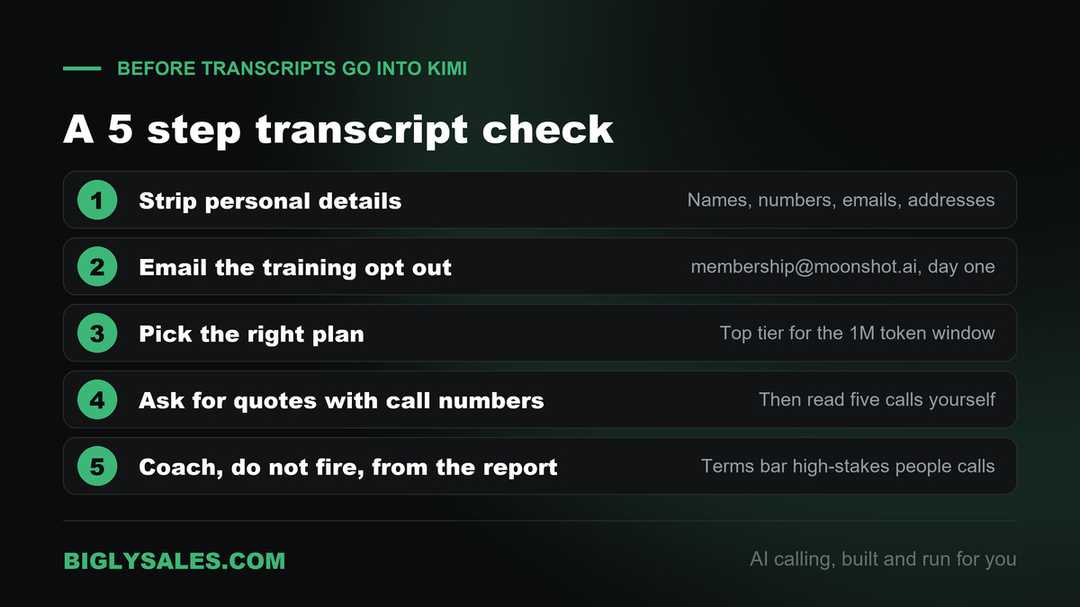
One rule from Kimi’s own terms belongs here. They say you must not use its output about an identifiable person to make decisions with a legal or material effect, including employment decisions.
So use the report to coach and to fix scripts. Do not use it to decide who gets fired. Pair it with a normal call quality review process run by a person.
And before any of this, make sure your calls were recorded the legal way. Our guide to business call recording covers the basics.
6 prompts that work on long documents
These prompts work on any big pile of text. Transcripts are only one example. Each one asks for evidence so you can check the answer.
| Goal | Prompt to try |
|---|---|
| Top objections | List the 10 most common objections in these calls. Count how often each appears and quote two examples with call numbers. |
| What changed | Compare the first two weeks with the last two weeks. What did customers start or stop saying? |
| Lost deals | Find every call marked lost. What were the last three things the customer said before ending the call? |
| Script gaps | Here is our call script. Where do reps go off script most often, and does it help or hurt? |
| Questions to answer | List every question customers asked that the rep could not answer. Group them by topic. |
| Contract review | Read all of these contracts. Make a table of renewal dates, notice periods and price increase terms with page numbers. |
Ask one question at a time. Long answers to five questions at once get vague fast.
What Kimi costs
Kimi has a free plan and four paid plans. Here are the international prices from Kimi’s pricing help page.
| Plan | Monthly | Billed yearly | Projects | Project storage |
|---|---|---|---|---|
| Plus | $19 | $180 a year | 20 | 20GB |
| Pro | $39 | $372 a year | 20 | 20GB |
| Max | $99 | $948 a year | 100 | 50GB |
| Ultra | $199 | $1,908 a year | 100 | 50GB |
All plans share one monthly credit pool across features like Deep Research, slides, Kimi Code and Kimi Work. Heavy use of one feature eats into the others.
There is also Kimi Business for companies. It has a contact sales button and no public price.
The API is priced by usage instead. On November 14, 2026, the Kimi API price page listed these rates per million tokens.
| Model | Input | Output | Cached input |
|---|---|---|---|
| kimi-k3.1-pro | $2.00 | $10.00 | $0.20 |
| kimi-k3.1-pro-highspeed | $4.00 | $20.00 | $0.20 |
| kimi-k3 | $3.00 | $15.00 | $0.30 |
Do the math on the transcript job. Sending a full million tokens to K3.1 Pro costs about two dollars in input. Each follow up question on the same month costs far less, because the repeated text is billed at the cached rate.
Batch jobs that can wait are billed at 60% of the standard price.
Free setup, live fast
Get calls worth reviewing in the first place
Bigly Sales runs fully managed AI calling for inbound and outbound, with summaries and transcripts for every call and live transfer to your team. You get a free 30-minute setup, a $1,000 value, and most teams go live within 24 hours.
Can you use Kimi for business
Yes. The Kimi Terms of Service, effective November 5, 2026, give you the right to use the service for your personal or internal business purposes.
That matters. Not every free assistant allows it. In our Qwen guide I covered an app whose terms limit it to private, non-commercial use.
Three other lines in Kimi’s terms are worth knowing.
- You own the output. The terms assign their rights in the output to you.
- No guarantee of accuracy. The terms tell you not to treat output as factual or authoritative.
- No high-stakes calls on people. You must not use output about an identifiable person for decisions on credit, employment, housing, insurance, education or healthcare.
That last line hits sales teams in two places. Rep performance reviews, and any lending or insurance lead you might score. Keep a person in charge of those calls.
I am not a lawyer, and terms change. Read the current version yourself before you roll Kimi out to a team.
Where your data goes
This is the part to read twice before you upload a single transcript. All of it comes from the Kimi privacy policy, the Terms of Service and the API docs.
| Question | Kimi app (kimi.ai) | Kimi API |
|---|---|---|
| Who runs it | NOVASCENT PRIVATE LIMITED, Singapore | Moonshot AI PTE. LTD., Singapore |
| Where data is stored | Servers that may be outside your country. No country named | Servers in Singapore |
| Used for training | Yes, by default | Possible unless you agree otherwise in writing |
| How to stop training | Email [email protected]. Applies going forward only | Ask sales for an enterprise arrangement |
| Zero retention option | Not offered | Zero Data Retention for enterprise customers, on request |
A few notes on that table.
First, the app opt out is by email, not a switch. Send it on day one. The terms say it does not pull back content already used in earlier training.
Second, the API docs send mixed signals. The Zero Data Retention page says the platform does not use enterprise customer data for training by default. The API terms say content may be used unless you agree otherwise in writing. If it matters to you, get it in writing.
Third, Zero Data Retention has exceptions. Batch jobs, directly uploaded images and videos, and data that passes through third-party connectors are not covered.
Moonshot is a Chinese company, and the international service runs from Singapore. In July 2026, news outlets reported the US government was weighing limits on Chinese AI models, Kimi included. I found no final rule when I checked. Watch for one if you sell to government buyers.
My simple rule. Public material and your own notes are fine. Customer details get removed before upload, every time.
3 ways to run Kimi on your documents
There are three routes, and each one handles your data differently.
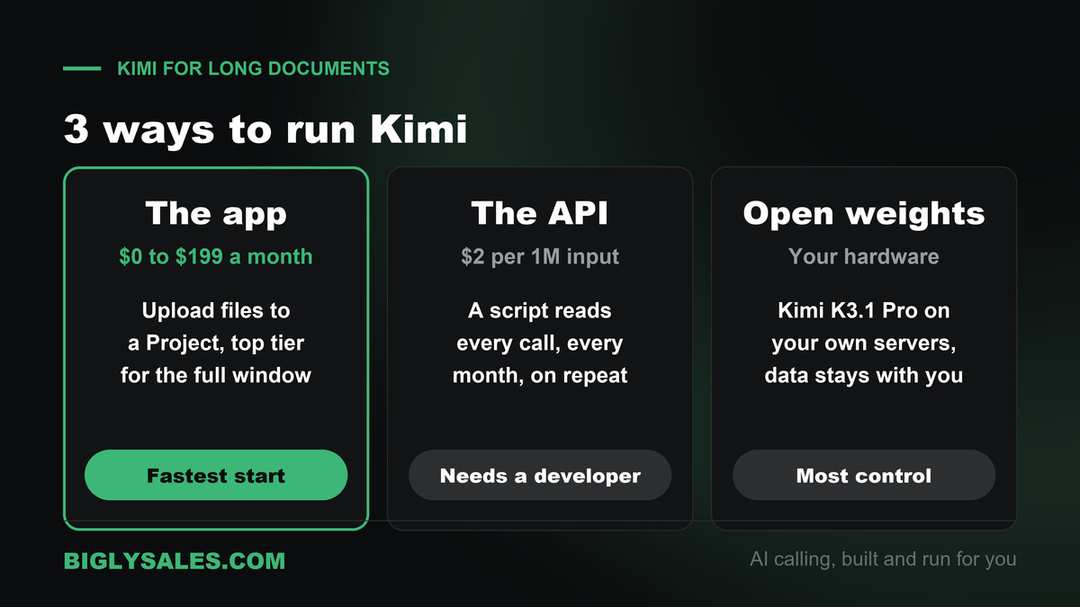
| Route | Who runs it | Cost | What you need |
|---|---|---|---|
| The Kimi app | Moonshot, from Singapore | Free to $199 a month | An account. Top tier for the full window |
| The Kimi API | Moonshot, servers in Singapore | Pay per token | A developer |
| Open weights you host | You | Your own hardware | Serious servers and a technical team |
1. The app, for most small teams
Upload cleaned files to a Project and ask away. This is the fastest start. Send the training opt out first.
2. The API, for a repeatable job
If you review transcripts every month, a developer can script it. Pull last month’s calls, strip personal details, send them to the API and save the report. Kimi’s API works with the same request format as OpenAI’s and Anthropic’s, so most developers can wire it up quickly.
3. The open weights, for full control
Moonshot published Kimi K3.1 Pro on Hugging Face under the Kimi K3.1 Pro License. It allows commercial use. Very large companies face two extra conditions, and those conditions do not apply to internal use.
The catch is size. At 2.8 trillion parameters, this is not a laptop model. It needs serious server hardware and someone who knows how to run it. For most small businesses, the app or the API is the realistic choice.
Kimi, MCP and Bigly Sales
MCP, the Model Context Protocol, is an open standard that lets an AI assistant connect to other software. Our guide to MCP servers for AI calling explains it in plain words.
Kimi supports MCP in two places I could confirm at the source.
| Product | How you add a server | Who it is for |
|---|---|---|
| Kimi Code CLI | Run /mcp-config, or add the server URL to an mcp.json file | Developers and technical users |
| Kimi Work and Kimi plugins | Build a personal plugin and give it an MCP server URL | Desktop users on K3 models |
The details are in the Kimi Code MCP docs and Kimi’s plugin help page. Kimi Code supports sign in to an MCP server through OAuth or a token stored in an environment variable. Plugins do not work in every Kimi mode yet, so check the help page for where they run.
The Bigly Sales MCP server brings your calling data into an AI assistant. That includes call outcomes, summaries and transcripts. The page names ChatGPT and Claude. It does not list Kimi, so ask your Bigly account rep before you connect the two.
Here is the privacy warning that goes with it. Any business data you connect to Kimi goes to Moonshot’s servers. Moonshot is a Chinese company running its international service from Singapore. Decide whether that fits your customer promises before you connect anything.
The connection details are not public. Your Bigly account rep can answer them during your free setup. If Kimi is on your list, bring these questions.
- Which assistants does the Bigly MCP server support today?
- If we use Kimi, which data leaves our account and where is it processed?
- Which tools only read data and which can change it?
- How fast can access be removed if someone leaves?
Who should skip Kimi
- Teams that cannot strip personal details from their files before upload.
- Businesses whose customer contracts or regulators limit where data can be processed.
- Companies selling to government buyers, while US policy on Chinese AI models is unsettled.
- Anyone who only works with short documents. A long memory you never use is just a bigger bill.
- Teams that live in a European data setup. Our Mistral Vibe guide covers an EU option.
- Anyone who wants AI to call leads. Kimi does not place phone calls. That is a calling platform’s job.
Kimi vs ChatGPT vs DeepSeek vs Qwen
People search for these comparisons, so here is the short version for a business owner.
| Assistant | Made by | Stands out for | Watch out for |
|---|---|---|---|
| Kimi | Moonshot AI, China, international service run from Singapore | A one million token window and open weights | App content used for training unless you opt out |
| ChatGPT | OpenAI, United States | Business plans with admin controls | Paid per seat |
| DeepSeek | DeepSeek, China | Low API prices and open models | Its policy says data is stored in China |
| Qwen | Alibaba, China, app run from Singapore | A free app and open models | App terms limit it to personal use |
My read is simple. Kimi is the one to try when the job is a huge pile of text. For a shared daily assistant with full admin controls, ChatGPT or Claude is the easier road.
Kimi AI FAQ
What is Kimi AI?
Kimi AI is an AI assistant made by Moonshot AI, a company based in China. You can chat with it on the web, on your phone and in a desktop app. It runs on Moonshot’s own models, Kimi K3 and Kimi K3.1 Pro. Those models can read about one million tokens at once, which is why people use Kimi for very long documents.
Who owns Kimi AI?
Kimi is built by Moonshot AI. Outside mainland China, the service is run by NOVASCENT PRIVATE LIMITED, a company registered in Singapore, according to the Kimi Terms of Service. The developer API is run by Moonshot AI PTE. LTD., also in Singapore. Users in mainland China use a separate site, kimi.com, with its own rules.
Is Kimi AI free?
Kimi has a free plan, and you can try it without paying. Paid plans start at $19 a month for Plus and go up to $199 a month for Ultra, as listed in the Kimi help center on November 14, 2026. The one million token window for very long documents is tied to the top membership tier in the app.
Is Kimi AI safe to use?
It is safe for public material and your own notes. Slow down before you upload customer data. The Kimi privacy policy says your content can be used to train its models and stored on servers outside your country. You can opt out of training by email. Remove names and phone numbers from documents before you upload them.
Can I use Kimi AI for my business?
Yes. The Kimi Terms of Service let you use it for your personal or internal business purposes. That is different from some free assistants that ban work use. There is one limit to know. The terms say you must not use its output about an identifiable person to make decisions such as hiring or firing.
How long a document can Kimi read?
Kimi K3 and K3.1 Pro have a context window of 1,048,576 tokens, about one million. Kimi’s own docs say one token is roughly three to four characters of English. That works out to several hundred thousand words in one go. In the app, the full window needs the top membership tier and the Extra long conversation setting.
Does Kimi train on my data?
By default, yes, for the Kimi app. The Terms of Service say your content can be used to train and improve the service. You can opt out by emailing [email protected], and the opt out applies going forward only. For the API, enterprise customers can ask for Zero Data Retention, which deletes prompts and answers once the response is returned.
How much does the Kimi API cost?
On November 14, 2026, the Kimi API price page listed Kimi K3.1 Pro at $2.00 per million input tokens and $10.00 per million output tokens. Repeated input that hits the cache costs $0.20 per million tokens. Batch jobs that do not need an instant answer are billed at 60% of the standard price.
Is Kimi open source?
Kimi K3.1 Pro is open weight. Moonshot published the model on Hugging Face under its own Kimi K3.1 Pro License. The license allows commercial use, with two extra conditions for very large companies. Those conditions do not apply to internal use. The model has 2.8 trillion parameters, so running it yourself takes serious server hardware.
Can Kimi connect to Bigly Sales?
Kimi supports MCP, the standard Bigly Sales uses to bring calling data into an AI assistant. Kimi Code and Kimi Work can both add an MCP server. Bigly’s MCP page names ChatGPT and Claude and does not list Kimi, so ask your Bigly account rep before you plan around it.
The bottom line
Kimi AI is worth a look for one reason above all. It can read a month of documents in one conversation and answer questions across all of it. Clean the files first, send the training opt out, ask for quotes, and check them.
A transcript review only helps if the calls happen in the first place. When you want AI that calls, qualifies and transfers live to your team, with consent and calling windows checked before every dial, pair your assistant with a calling platform built for that.
Ready to talk
Let AI make the calls, then review them
Bigly Sales plans start at $99 a month for inbound and outbound AI calling. Book a call and we will map a plan to your call volume and show you which assistants the MCP server supports.