


Microsoft Copilot is Microsoft’s AI assistant, and for a sales team it lives inside Outlook, Teams, Excel, Word and PowerPoint. If your reps already spend the day in Microsoft 365, Copilot is the assistant that can read that day.
This guide shows how to use Copilot for sales, and it is written for the sales manager, not the IT team. You will see which license your reps need, what Copilot does in each app, a prompt library you can hand out on Monday and how Copilot can reach your calling data through the Bigly Sales MCP server.
It is the fourth guide in our series, after how to use Claude, ChatGPT for sales teams and how to use Gemini for sales.
Microsoft Copilot is the AI assistant built into Microsoft 365. Copilot Chat comes at no extra cost with eligible plans, but it mostly answers from the web. The paid license, listed at $21 per user per month for Copilot Business on October 30, 2026, reads your email, files and meetings and works fully inside Excel, Word and PowerPoint. Bigly Sales lists GitHub Copilot in VS Code as a supported client for its MCP server. Copilot helps reps prepare and follow up. It does not dial or talk to leads.
Key Takeaways
- Copilot Chat is included with eligible Microsoft 365 plans and answers mostly from the web.
- The paid license grounds answers in your email, files, meetings and chats.
- Copilot Business tops out at 300 users per tenant.
- Copilot does not work in Teams meetings hosted outside your organization.
- Copilot shows anything a rep has permission to see, so clean up sharing first.
- Bigly Sales connects through GitHub Copilot in VS Code. Copilot Studio is a route to test.
- Copilot supports the people on the phone. It does not make the calls.
Table of contents
- What Microsoft Copilot is
- What sales teams use Copilot for
- Copilot Chat vs the paid Copilot license
- Copilot plans and what they cost
- How to use Copilot in Outlook for follow-ups
- How to use Copilot in Teams meetings
- How to use Copilot in Excel for pipeline
- Copilot in PowerPoint and Word for deal decks
- A prompt library for sales managers
- Agents, Researcher and the Sales agent
- How to connect the Bigly Sales MCP server
- A 30 day rollout plan
- Privacy, permissions and oversharing
- Who this is wrong for
- Copilot vs Gemini vs ChatGPT vs Claude for sales
- How to use Copilot FAQ
- The bottom line
What Microsoft Copilot is
Microsoft Copilot is an AI assistant that runs on large language models and sits inside Microsoft 365. It shows up as a chat at copilot.cloud.microsoft, as an app on web, desktop and phone, and as a side panel in Outlook, Teams, Word, Excel and PowerPoint.
Microsoft recently renamed parts of the product, so you will see both Microsoft Copilot and Microsoft 365 Copilot in menus and on price pages. For a sales manager, the name matters less than one question. Can Copilot see your team’s work data, or only the web? That depends on the license, and it changes everything below.
GitHub Copilot is a different product, a coding assistant sold separately. It still matters here, because it is one way to reach your Bigly Sales data.
What sales teams use Copilot for
Copilot pays off on the busywork around a deal.
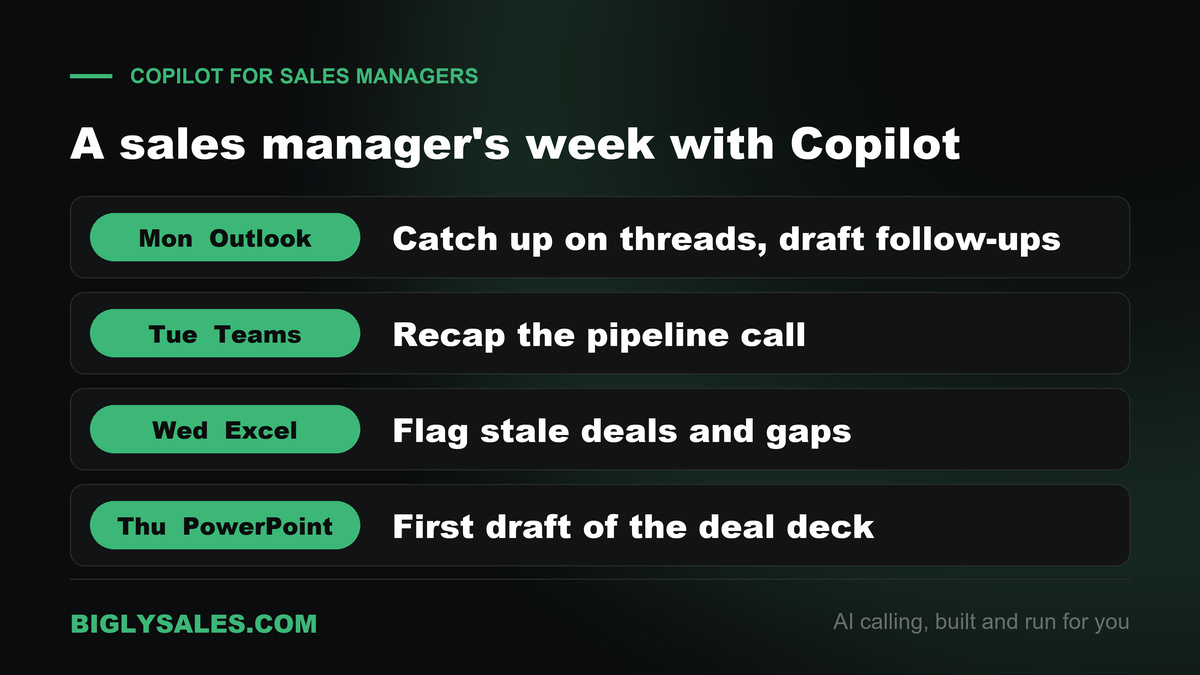
- Inbox catch up. Summarize a long thread with a buyer and list what they asked for.
- Follow-up emails. Draft a recap after a call, then fix the tone and the facts yourself.
- Internal meeting recaps. Pull decisions and action items out of a pipeline review.
- Lead list cleanup. Sort, flag and chart an export in Excel before anyone dials it.
- Deal decks. Turn a Word proposal into a first draft of a PowerPoint deck.
- Account research. Ask for a short brief on a company before a first call.
None of this replaces judgment. Copilot can get a price, a date or a promise wrong, and Microsoft’s own privacy page says AI responses are not guaranteed to be fully factual. The rep who hits send still owns the email.
Copilot Chat vs the paid Copilot license
This is the first decision, and many teams assume everyone already has the full version.
Copilot Chat
According to Microsoft’s Copilot overview, Copilot Chat is included with eligible Microsoft 365 licenses and works mostly from web data. It can use a work file only if you upload it, pick it in the prompt or have it open in Outlook or Teams.
The paid Copilot license
The paid license adds what Microsoft calls grounding in organizational data. Copilot reads the emails, files, meetings, calendars and chats a rep has access to through Microsoft Graph, without anyone pasting them in. It also gets priority access in Word, Excel and PowerPoint, plus agents such as Researcher and Analyst.
A simple test tells you which one a rep has. Ask Copilot to summarize what a named customer asked for across last week’s emails. If it can answer without you pasting anything, that rep has the paid license.
Copilot plans and what they cost
The prices below come from Microsoft’s Copilot for business page and its enterprise page, checked on October 30, 2026. All prices are per user per month in US dollars.
| Plan | Price paid yearly | Price paid monthly | What you get |
|---|---|---|---|
| Copilot Chat | $0 | $0 | Included with eligible Microsoft 365 plans, answers mostly from the web |
| Copilot Business add-on | $21 ($18 promo) | $25.20 | Copilot in Outlook, Teams, Word, Excel and PowerPoint grounded in work data, up to 300 users |
| Business Standard with Copilot | $23.50 | $28.20 | Microsoft 365 Business Standard and Copilot in one plan |
| Business Premium with Copilot | $32 | $38.40 | Business Premium security features and Copilot in one plan |
| Microsoft 365 Copilot enterprise add-on | $30 | $31.50 with a yearly commitment | Full Copilot for larger companies, needs a qualifying Microsoft 365 plan |
The $18 Copilot Business promotion is for the first year, for existing eligible Business customers, and runs through December 31, 2026. Microsoft also bills some newer features, such as Copilot Cowork, by usage on top of the license. Copilot in Teams needs a Teams license.
For a team under 300 people, Copilot Business is the usual starting point, and you do not have to buy it for everyone. Start with the reps who live in email and meetings.
How to use Copilot in Outlook for follow-ups
Outlook is where reps lose the most time. Copilot can draft emails, summarize threads and coach your own draft for clarity and tone.
Catch up on a thread
Open a long thread with a buyer and ask Copilot to summarize it. Then ask a follow-up question, such as what the buyer still needs from you before they sign. This works on Copilot Chat too, because the thread is open in front of you.
Draft the follow-up
Ask Copilot to draft a reply that confirms the next meeting, answers the open question and asks for one decision. Keep it short. Then read it like the buyer would, and cut anything you cannot back up.
How to use Copilot in Teams meetings
In a Teams meeting, Copilot can summarize the key points, show who said what, suggest action items and answer questions while the meeting is still running. Microsoft’s Teams meeting guide lists prompts such as asking where people disagree or what to ask next to move the meeting forward.
Two limits matter for sales.
- Turn on transcription. Copilot can run during a meeting without it, but to ask questions after the meeting ends you need transcription on during the call.
- Host the meeting yourself. Microsoft says Copilot does not work in meetings hosted outside your organization. If the prospect sends the Teams link, your rep gets no Copilot notes. Send your own invite when you can.
Tell prospects when a call is being transcribed. Many states require consent to record.
Internal meetings are the easy win. Run Copilot on every pipeline review and ask for a table of deals, owners and next steps.
Free setup, live fast
Let AI make the calls your reps prep for
Bigly Sales runs fully managed AI calling for inbound and outbound, with live transfer to your reps. You get a free 30-minute setup, a $1,000 value, and most teams go live within 24 hours.
How to use Copilot in Excel for pipeline
Excel is where a sales manager sees the clearest payoff. Copilot can analyze data, surface insights, write formulas and build charts from a plain request.
Here is a routine that works on a Monday morning.
- Export your open pipeline or a fresh lead list to Excel and format it as a table.
- Ask Copilot to flag rows with a missing phone number, a missing owner or a close date in the past.
- Ask for a chart of pipeline value by stage and by rep.
- Ask which deals have not moved stage in 30 days.
- Paste the result into your team channel and assign each stale deal an owner.
Read the formula Copilot writes before any number goes into a forecast.
Copilot in PowerPoint and Word for deal decks
Copilot in PowerPoint can build a presentation from a prompt or an existing file, summarize a deck and apply formatting across every slide.
Write the proposal in Word first and ask Copilot to tighten it into one page. Then point Copilot in PowerPoint at that file and ask for a ten slide deck with the buyer’s problem, your plan, the price and the next step.
Expect to rewrite the story. Copilot gets the structure fast, but it does not know why this buyer will say yes.
A prompt library for sales managers
Hand these to your team as a starting set.
| Job | App | Prompt to try |
|---|---|---|
| Thread catch up | Outlook | Summarize this thread and list every question the buyer is still waiting on |
| Follow-up | Outlook | Draft a short reply that confirms Thursday’s call and asks who else should join |
| Meeting recap | Teams | Make a table of the deals we discussed with owner, next step and due date |
| Pipeline check | Excel | Show deals with a close date in the past or no stage change in 30 days |
| Deal deck | PowerPoint | Create a ten slide deck from this proposal for a skeptical finance buyer |
| Call prep | Copilot Chat | Give me a short brief on this company and three questions to open the call |
Ask reps to post the prompts that work in a shared channel. After a month you will have a library in your team’s own words.
Agents, Researcher and the Sales agent
Agents are focused versions of Copilot that handle one kind of job. The paid license includes Microsoft’s ready made agents, such as Researcher for deeper research and Analyst for working through data.
The Sales agent
Microsoft also sells a Sales agent built for sellers. Per Microsoft’s Sales agent overview, it works in Outlook and Teams and connects to Salesforce Sales Cloud and Dynamics 365 Sales. It can summarize customer emails with CRM details, draft replies with opportunity data, prepare reps for meetings and save contacts and updates back to the CRM.
If your team runs Salesforce or Dynamics, the Sales agent is worth a trial.
Build your own with Copilot Studio
Copilot Studio is Microsoft’s low code tool for building custom agents. A sales ops lead can build an agent that answers questions from your playbook, then publish it to Teams and Microsoft Copilot so reps can mention it with the @ sign. Copilot Studio is also the route Microsoft provides for connecting MCP servers, which brings us to calling data.
How to connect the Bigly Sales MCP server
MCP is an open standard that lets an AI assistant talk to other software. If the term is new, our explainer on what MCP is covers it in plain words.
The Bigly Sales MCP server lets an assistant pull your calling data into the chat. You can ask who picked up, who wants a callback, which leads showed interest, how a campaign is pacing and how many minutes you used. Your assistant sees only what your Bigly account allows, and the server is available to every Bigly Sales customer.
Connect through GitHub Copilot in VS Code
The Bigly Sales team lists VS Code with GitHub Copilot among the supported clients for its MCP server. VS Code is a free code editor, so this setup suits a sales ops lead or an admin more than every rep. The VS Code guide to MCP servers covers the screens below.
- Install VS Code and sign in to GitHub Copilot.
- Get the Bigly Sales MCP server address from your Bigly account or your account rep.
- Open the Command Palette, search for MCP Add Server and run it.
- Choose HTTP, paste the server address and name it bigly-sales.
- Choose Global so the server is there in every project.
- Follow the sign in prompt and log in to your Bigly Sales account.
- Open Copilot Chat and ask a plain question, such as which leads asked for a callback this week. Expand the tool call to confirm the answer came from Bigly Sales.
Start with read questions, such as call outcomes and transcripts. Add requests that change data, like adding contacts to a campaign, one at a time once you trust the answers.
What about Microsoft 365 Copilot
Microsoft’s Copilot Studio docs show that an agent can connect to an existing MCP server. In the agent, go to Tools, select Add a tool, then New tool, then Model Context Protocol. Enter a server name, a description and the server URL, then pick no auth, an API key or OAuth 2.0. Copilot Studio supports the Streamable HTTP transport and needs generative orchestration turned on.
Once that agent is published to Teams and Microsoft Copilot, reps could ask it about calls from inside Microsoft 365. Bigly Sales has not published steps for this route yet. Treat it as a pilot to run with your Bigly team, and use VS Code for now.
A 30 day rollout plan
- Week one, check licenses. Find out who has Copilot Chat only and who has the paid license. Pick five to ten reps who spend the most time in email and meetings.
- Week two, fix sharing. Ask IT to review SharePoint and Teams permissions so Copilot cannot surface pricing sheets, HR files or another rep’s accounts to the wrong person.
- Week three, build habits. Hand out the prompt library. Run Copilot on every internal pipeline call and ask reps to post one prompt that saved them time.
- Week four, review and decide. Compare time saved with rework created. Decide on more seats, a Sales agent trial or a Bigly Sales MCP pilot.
Privacy, permissions and oversharing
Microsoft’s Copilot privacy page says prompts, responses and data accessed through Microsoft Graph are not used to train foundation models, including the ones behind Copilot. Prompts and responses are stored under the same commitments as the rest of your Microsoft 365 content.
The real risk sits inside your company. Copilot only shows data a user has at least view permission to, which sounds safe until you remember how many old files are shared with everyone. If a pricing exception or a commission sheet is open to the whole company, Copilot can surface it to any rep who asks the right question.
Reps should also sign in with their work account, because a personal Microsoft account does not get the same protections.
Who this is wrong for
- Teams on Google Workspace. Copilot pays off when email, calendar and files live in Microsoft 365. Our Gemini guide covers the Google side.
- Teams that want an AI to dial and talk to leads. Copilot does not place calls, so you need an AI calling platform for that.
- Teams that want Bigly Sales data inside Outlook or Teams today. The confirmed route is GitHub Copilot in VS Code.
- Teams with a messy SharePoint and no time to fix permissions first.
Copilot vs Gemini vs ChatGPT vs Claude for sales
All four assistants help with prep and writing. The difference is where each one lives and how it reaches your other tools. Our guides on Claude, ChatGPT and Gemini cover the others in depth.
| Assistant | Where it lives | Team plan | Custom MCP servers | Good fit for |
|---|---|---|---|---|
| Copilot | Inside Outlook, Teams, Excel, Word and PowerPoint | Copilot Business or the enterprise add-on | Copilot Studio agents, and GitHub Copilot in VS Code | Teams that run on Microsoft 365 |
| Gemini | Inside Gmail, Docs, Sheets and Meet | Bundled with Google Workspace | Gemini Enterprise Standard or Plus, and Gemini CLI | Teams that run on Google Workspace |
| ChatGPT | Its own app and workspace | ChatGPT Business | Admins and owners add them in a Business workspace | Teams that want a separate assistant workspace |
| Claude | Its own app, desktop and web | Claude Team | Custom connectors, added by an Owner on Team | Teams that write long documents and reports |
How to use Copilot FAQ
How do I use Copilot for sales?
Start where your reps already spend the day. Use Copilot in Outlook to summarize long threads and draft follow-ups, in Teams to recap internal meetings, in Excel to clean and sort lead lists and in PowerPoint to build a first draft of a deal deck. Save the prompts that work and share them with the team. Check every draft before it reaches a buyer.
Is Microsoft Copilot free for business?
Partly. Microsoft says Copilot Chat is included at no extra cost with eligible Microsoft 365 plans. That free version mainly uses web data, and it works with a file only when you upload it or have it open in Outlook or Teams. Copilot grounded in your email, files and meetings, with the full experience in Word, Excel and PowerPoint, needs a paid Copilot license.
How much does Microsoft 365 Copilot cost?
When checked on October 30, 2026, Microsoft listed Copilot Business at $21 per user per month on a yearly plan, with a first year promotion of $18 for eligible Business customers through December 31, 2026. The enterprise add-on was $30 per user per month paid yearly. Both sit on top of a qualifying Microsoft 365 plan.
What is the difference between Copilot Chat and Microsoft 365 Copilot?
Copilot Chat is the included chat that answers mostly from the web. It can use a work file only when you hand it over. The paid Microsoft 365 Copilot license reads your emails, files, meetings and chats through Microsoft Graph automatically, gives priority access in Word, Excel and PowerPoint and includes agents such as Researcher and Analyst.
Can Copilot take notes in a Teams sales call?
Yes, for meetings your own organization hosts. Copilot can summarize who said what, list action items and answer questions during the call. To ask about the meeting afterward, turn on transcription during the meeting. Microsoft says Copilot does not work in meetings hosted outside your organization, so a call on the prospect’s Teams link will not get Copilot notes.
What is the Microsoft Sales agent?
Sales agent is Microsoft’s sales add-on for Copilot. It works in Outlook and Teams and connects to Salesforce Sales Cloud and Dynamics 365 Sales. It can summarize customer emails with CRM details, draft replies, prepare reps for meetings and save contacts and updates back to the CRM. Check Microsoft’s licensing page for current pricing.
Can Copilot connect to Bigly Sales?
Yes, through GitHub Copilot in VS Code. The Bigly Sales team lists VS Code with GitHub Copilot among the supported clients for its MCP server, and the server is available to every Bigly Sales customer. Microsoft 365 Copilot can reach MCP servers through Copilot Studio agents, but Bigly Sales has not published steps for that route yet, so test it with your Bigly team first.
Does Copilot Studio support MCP servers?
Yes. Microsoft’s docs show a Copilot Studio agent can connect to an existing MCP server through an onboarding wizard on the agent’s Tools page. It supports the Streamable HTTP transport and sign in with no auth, an API key or OAuth 2.0. Generative orchestration must be on. Once published, the agent can run inside Teams and Microsoft Copilot.
Does Microsoft train Copilot on my company data?
No. Microsoft’s privacy page says prompts, responses and data accessed through Microsoft Graph are not used to train foundation models, including the ones behind Copilot. The bigger risk is internal. Copilot shows anything a user has permission to view, so a messy SharePoint can put pricing or HR files in front of the wrong rep.
Should a sales team choose Copilot, Gemini, ChatGPT or Claude?
Pick the one closest to where your team already works. Copilot fits teams that live in Outlook, Teams and Excel, because it reads that data directly. Gemini fits Google Workspace teams. ChatGPT and Claude suit teams that want a separate assistant. All four help with prep and writing, and none of them places calls to your leads.
The bottom line
If your team runs on Microsoft 365, Copilot is the assistant that can read the work your reps already do. Start with a few paid seats, clean up sharing, hand out a prompt library and use it on Outlook threads, internal Teams calls and Excel lead lists.
Copilot makes your reps faster at everything around the phone. It does not make the calls. When you want an AI that dials, qualifies and transfers live to your reps, pair your team with a calling platform built for that job.
Ready to talk
Put more live conversations on your reps’ calendars
Bigly Sales plans start at $99 a month for inbound and outbound AI calling. Book a call and we will map it to your call volume and your Microsoft stack.